

Most businesses run a modern MS Dynamics ERP but still rely on fragmented reporting methods, emails, disconnected spreadsheets, and legacy SQL dumps. Call it the “Scatter Syndrome.“
The 2025 reality hits hard. Manual data entry now costs companies $28,500 per employee annually, according to Parseur research. Data silos remain the top concern for 68% of business leaders, preventing real-time decisions. Even worse, 70% of data leaders believe their most valuable business insights sit trapped in inaccessible systems.
This isn’t about better charts. It’s a fundamental architectural shift. Senior data architects agree: if your data isn’t unified in 2025, your strategy is just a guess. The era of monthly static reports is over.
We’ll cover 9 specific insights to move from hunting for data to acting on intelligence with MS Dynamics ERP.
The Architectural Shift: Building a Single Source of Truth
Your MS Dynamics ERP collects data beautifully. The problem? That data gets stuck in three separate architectures fighting for attention. Here’s how to fix it.
Insight #1: Retire “Bring Your Own Database” (BYOD) for Azure Synapse Link
Microsoft decommissioned Export to Data Lake on March 25, 2025. BYOD is the last legacy option standing, and it shows its age.
BYOD requires nightly exports that take 3+ hours for large datasets. Your ERP performance takes a hit during batch processing. IT teams spend hours troubleshooting when exports fail halfway through.
Azure Synapse Link replaces this bottleneck with continuous real-time data streaming. Create, update, and delete transactions pushed to your data lake without crashing your system.
The technical win? The Delta Lake format compresses data to one-third its original size. Your storage costs drop. Query speeds increase. Your MS Dynamics ERP stays responsive during business hours.
Insight #2: Embrace Microsoft Fabric for “OneLake” Unification
Microsoft Fabric integration grew 75% in one year, from 11,000 to 19,000 organizations as of December 2025. There’s a reason.
OneLake treats all data (finance, operations, sales) as one logical lake. No more moving data around constantly. Dataverse creates shortcuts that point to data stored elsewhere. Your data stays in place. Authorized users access it via Fabric.
One industrial contractor documented 70% faster reporting after switching. Their project status cycles dropped from days to minutes. That’s the unified analytics strategies approach working.
Insight #3: Standardize on Dataverse
Stop building reports directly on raw SQL tables. Use the Dataverse common data model instead.
Here’s why it matters: a “customer” in your sales CRM should be the exact same entity as the “customer” in your finance ERP. Dataverse ensures that consistency. The Model Context Protocol (MCP) servers launched in December 2025 provide dynamic, governed access to ERP data governance for AI agents.
Business Performance Analytics (BPA) creates semantic models where “margin” and “cash flow” mean the same thing across operational and analytical workloads. No more reconciling conflicting definitions between departments.
Now let’s talk about getting this data into users’ hands without forcing them to leave their workflows.
The User Experience: Making Data Accessible
Building the perfect data architecture means nothing if users can’t access insights when they need them. These three changes put intelligence exactly where work happens in your MS Dynamics ERP.
Insight #4: Move from “Attached” to “Embedded” Power BI
Don’t make users leave the MS Dynamics ERP to see a graph. Embedded Power BI displays dashboards directly inside Dynamics 365 workspaces.
Real examples of embedding:
- Credit limit warnings appear on the Sales Order screen when a customer approaches their threshold.
- Inventory turns display on the Warehouse Manager’s Role Center with real-time data streaming updates every 15 minutes.
- AP clerks see vendor balance aging charts without opening separate reporting tools.
The technical setup is automatic. Power BI Embedded service deploys with cloud-hosted MS Dynamics ERP environments. No separate license is required for basic use; it’s bundled with your Finance & Operations deployment.
Dynamics 365 Business Central Version 26 (released January 2025) added cross-company reporting. One dashboard pulls data from multiple legal entities. Finance teams monitor consolidated KPIs without switching between company codes.
This approach supports data silo elimination by connecting information that previously lived in separate systems.
Insight #5: Democratize Data with Copilot (AI)
Users shouldn’t need SQL to ask questions. The 2025 Wave 2 update brought natural language queries to MS Dynamics ERP powered by Azure OpenAI Service.
How it works in practice:
- Type “Show me the top 3 overdue suppliers this quarter.” → Get an instant table with amounts and days overdue.
- Ask, “Which products have declining margins?” → Copilot analyzes six months of cost data and flags 12 items.
- Request “Forecast Q1 revenue by region” → Predictive analytics 2025 models generate projections based on pipeline and historical patterns.
Sales teams using Copilot in MS Dynamics ERP cut report generation time by 50%. They’re not writing queries or waiting for IT tickets. The system understands business terminology.
AI agents in Microsoft Fabric integration access OneLake data with role-based dashboards security. A regional VP’s agent only sees their geography. Finance agents pull from the full dataset. This unified analytics strategies approach ensures everyone works from the same source of truth.
Insight #6: Enforce Role-Based Analytics
Stop sending the same 50-page PDF to everyone. Create role-based dashboards that filter automatically based on ERP data governance policies.
Security that follows the data:
- Regional managers query sales data → Ms. Dynamics ERP shows only their territory records in both the application and Power BI.
- Warehouse staff open inventory reports → See only their warehouse location.
- CFO accesses cash flow dashboard → Views consolidated global data
Dataverse common data model security travels with your data. Set permissions once in MS Dynamics ERP. They automatically apply to:
- Microsoft Fabric integration analytics queries
- Power BI reports
- Excel exports via OData
- Automated financial reporting workflows
OneLake security (preview since December 2025) enforces table-level and row-level policies across Spark, SQL, and Power BI engines simultaneously. No backdoor access through analytics tools.
The Warehouse Manager dashboard displays 8 metrics. The CFO dashboard shows 12 different ones. Same MS Dynamics ERP data source. Different views. Zero manual data entry costs for filtering.
Good data access matters, but only if that data stays clean and trustworthy.
Governance & Process: Keeping the Data Clean
Access without governance creates chaos. These three processes prevent your MS Dynamics ERP from becoming a garbage dump disguised as a data warehouse.
Insight #7: Kill the “Shadow Excel” Industry
The problem: Users export data to CSV at 9am. By noon, three transactions have posted in MS Dynamics ERP. Their spreadsheet now contains outdated information. They make decisions on stale data.
The fix: Implement Excel connectivity that stays live. Two methods work:
- OData feeds connect Excel directly to Dataverse common data model entities. Refresh updates the sheet with current data.
- Power Query creates refreshable connections that pull from MS Dynamics ERP on demand.
Research shows 60% of employees feel burned out by repetitive data tasks involving manual Excel updates. That’s $28,500 per employee in manual data entry costs wasted annually.
Data quality stats prove the point. 77% of organizations rate their data quality as average or worse, an 11-point decline from 2023. Shadow Excel workflows accelerate this decline by creating multiple versions of truth.
Insight #8: Automate Financial Statement Distribution
Power Automate schedules and burst key financial reports to stakeholders without human intervention. Set it once:
- Monday 8am: Send weekly cash position to treasury team
- Month-end Day 3: Distribute P&L to department heads
- Quarter-end Day 5: Email board packet to directors
Automated financial reporting workflows reduce financial close cycles from days to hours. No more “Did you send the report?” emails. No more forgot-to-click-send delays.
Copilot agents can auto-generate financial summaries and trigger distribution based on predefined schedules. The system monitors for completion, then fires the workflow.
Insight #9: Implement Row-Level Security (RLS) at the Source
Security defined once in Dataverse applies consistently across Power BI, Microsoft Fabric integration, and all analytical tools.
The security principle: If a regional manager shouldn’t see global salaries in MS Dynamics ERP, they shouldn’t see them in reports either.
OneLake security enforces table-level and row-level policies across:
- Spark notebooks
- SQL queries
- Power BI dashboards
- Excel connections
Configure security rules in MS Dynamics ERP using ERP data governance policies. Those rules propagate automatically. A finance analyst restricted to North America data gets the same restrictions in every analytics tool.
Audit trails track data access across the entire analytics stack. Compliance teams can prove who accessed what data and when. This supports data silo elimination while maintaining proper controls.
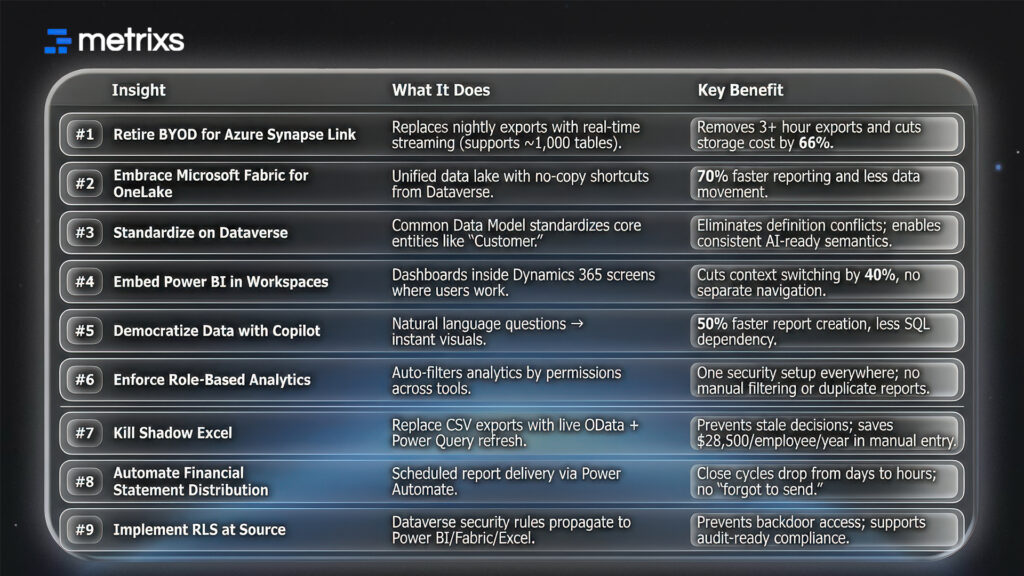
9 MS Dynamics ERP Insights at a Glance:
How Metrixs Can Help You Unify Your Data
Metrixs delivers advanced analytics and reporting insights specifically for Microsoft Dynamics 365 Finance & Operations. As a product of Veratas, it helps enterprises consolidate data seamlessly, transforming raw MS Dynamics ERP numbers into a unified view of performance across finance, inventory, and operations.
With a comprehensive library of 1,000+ metrics and 100+ pre-built reports, Metrixs enables 80% faster MS Dynamics ERP reporting and 99.9% data accuracy. It eliminates manual data entry costs and supports data silo elimination, ensuring your ERP serves as a growth engine.
Our Key Strengths:
- Rapid Integration: Get up and running in under six weeks with seamless MS Dynamics ERP implementation that minimizes business disruption.
- On-Demand Data Snapshots: Instantly capture historical trends, workforce shifts, and inventory flows for proactive MS Dynamics ERP decision-making.
- Multi-Region Flexibility: Track multiple currencies and units of measurement to ensure consistent unified analytics strategies across global locations.
- Centralized Financial Oversight: Automate balance sheets and financial summaries with automated financial reporting to reduce manual work and maintain real-time visibility.
- Measurable Impact: Smart insights help reduce operational costs by 15% and optimize resource allocation within your MS Dynamics ERP strategy.
Metrixs turn data into a competitive advantage, providing the clarity and speed businesses need to scale efficiently. Explore how Metrixs ensures you use your ERP to its full advantage → Metrixs.
Conclusion
Your team burns 9+ hours weekly transferring data between systems. That’s $28,500 per employee in manual data entry costs. Finance closes take days. Executives make decisions on outdated data.
Competitors using unified analytics strategies answer questions before you finish pulling reports. Data silos trap 70% of your most valuable insights in inaccessible systems.
The tools exist: Microsoft Fabric integration, Azure Synapse Link, and Power BI are already in your license stack. MS Dynamics ERP in 2025 means operational agility through real-time intelligence. Companies with strong integration achieve 10.3x ROI from AI initiatives versus 3.7x for those with poor connectivity.
Don’t let data silos slow you down. Contact Metrixs today for a Unified Reporting Strategy session.
FAQs
1. What is the difference between BYOD and Azure Synapse Link?
BYOD requires separate Azure SQL database provisioning with nightly batch exports taking 3+ hours. Azure Synapse Link offers continuous real-time data streaming for MS Dynamics ERP with create, update, and delete transactions. It supports 1,000 tables per profile without impacting performance. The Delta Lake format compresses data to one-third the original size, reducing storage costs and enabling faster queries.
2. Can I use Power BI with my on-premise Dynamics ERP?
Yes, via On-Premises Data Gateway. Cloud Microsoft Dynamics ERP versions (Business Central, Finance) offer deeper integration with the embedded Power BI service included automatically. You get role-based dashboards in workspaces and Copilot natural language queries without custom development. Cloud deployments deliver significantly richer analytics experiences, supporting unified analytics strategies across departments.
3. Is Microsoft Fabric included in my Dynamics license?
No, Microsoft Fabric integration requires separate capacity licensing starting with the F2 SKU. Integration is seamless—Fabric Link creates no-copy shortcuts to the Dataverse common data model, keeping MS Dynamics ERP data within governance boundaries. Organizations using Power BI Premium often find Fabric more cost-effective than maintaining separate Synapse workspaces and complex data pipelines.
4. How does Copilot help with reporting?
Copilot uses Azure OpenAI Service for conversational business queries in MS Dynamics ERP. Ask “Show top 3 overdue suppliers” and get instant visualizations. It auto-generates financial summaries analyzing historical data and seasonal trends. Users report 50% less time on reports, eliminating most manual data entry costs. Wave 2 agents proactively monitor KPIs.
5. What is the best way to handle historical data in Dynamics?
Archive data older than 3-5 years via Azure. Synapse Link to keep MS Dynamics ERP fast. Historical data remains reportable through Synapse serverless SQL pools or Fabric lakehouse. The Delta Lake format enables efficient querying. This maintains sub-second operational response times while preserving complete data lineage. ERP data governance policies apply automatically.

