

Businesses switch to Microsoft Fabric because it solves architecture problems that old tools cannot fix. Over 25,000 teams use it to build a unified OneLake ecosystem. You see a 379% ROI when moving to this platform. It speeds up data engineering and cuts maintenance by 90%.
Explore these microsoft fabric use cases to see how real-time analytics works. Many teams start a traditional BI migration to simplify their stack. Your data modernization process begins with these six examples.
Study these microsoft fabric use cases to see why lakehouse architecture improves data warehousing output. This guide helps you plan every step. You can use this tool to get results today.
Six Microsoft Fabric Use Cases vs Traditional BI Capabilities
Microsoft Fabric changes how you handle data by removing the walls between your tools. These microsoft fabric use cases show why old systems fail where this platform wins. You get better results when you start your traditional BI migration today.
1. Use Case 1: Real-Time Customer 360 for Retail & eCommerce
You build a customer 360 view by streaming live sales and web data into OneLake. Use Data Factory to pull info from your CRM and POS systems without complex code.
Real-time analytics then processes this data to trigger instant discounts or emails based on live user clicks. This microsoft fabric use cases approach lets you react to buyers in seconds. It is a core part of data modernization that turns passive reports into active sales tools.
2. Use Case 2: Predictive Maintenance and Supply Chain Optimization
You connect your factory sensors directly to a lakehouse architecture to monitor equipment health. Instead of waiting for a machine to break, you use data engineering pipelines to clean sensor data as it arrives.
These microsoft fabric use cases allow you to run machine learning models that flag vibration or heat issues early. Your supply chain analytics then automatically adjust part orders to prevent delays. This keeps your production line moving without the lag found in old data warehousing setups.
3. Use Case 3: AI-Driven Sales Forecasting and Demand Planning
You improve your demand planning by running machine learning models directly on your data in OneLake. This microsoft fabric use cases method eliminates the need to export files to external tools.
You combine your internal sales history with external market trends using Spark notebooks. The system then pushes these forecasts into Power BI for your sales team to view. Your data modernization project succeeds because your team gets accurate numbers faster.
4. Use Case 4: Automated Financial Reporting and Compliance
You automate your month-end close by using Data Factory to consolidate data from multiple ERP systems into your lakehouse architecture. This microsoft fabric use cases process removes manual data entry and reduces errors in your financial consolidation.
You set up scheduled pipelines that pull transactions into a central data warehousing environment for instant validation. Your team uses Power BI to generate audit-ready reports with full data lineage. This data modernization step ensures your compliance stays current without the usual stress.
5. Use Case 5: Data Mesh and Domain-Oriented Architecture
You empower different business units to own their data by setting up a data mesh within OneLake. Each team manages its own workspace while following central rules. This microsoft fabric use cases strategy stops the IT bottleneck and speeds up data engineering tasks across the company.
Marketing and Finance teams create their own data products for faster insights. Your traditional BI migration becomes a tool for team autonomy. It allows you to scale your data modernization efforts without losing control over your assets.
6. Use Case 6: Healthcare Data Integration and Patient Insights
You unify patient records, lab results, and billing info by ingesting them into a secure lakehouse architecture. Use real-time analytics to monitor patient vitals and trigger alerts for medical staff. These microsoft fabric use cases help you see the full picture of patient care in one dashboard.
You apply machine learning to predict readmission risks and improve discharge planning. This approach to data engineering keeps sensitive info safe while making it useful for doctors. Better data leads to better health outcomes for everyone.
Microsoft Fabric Use Cases At a Glance:
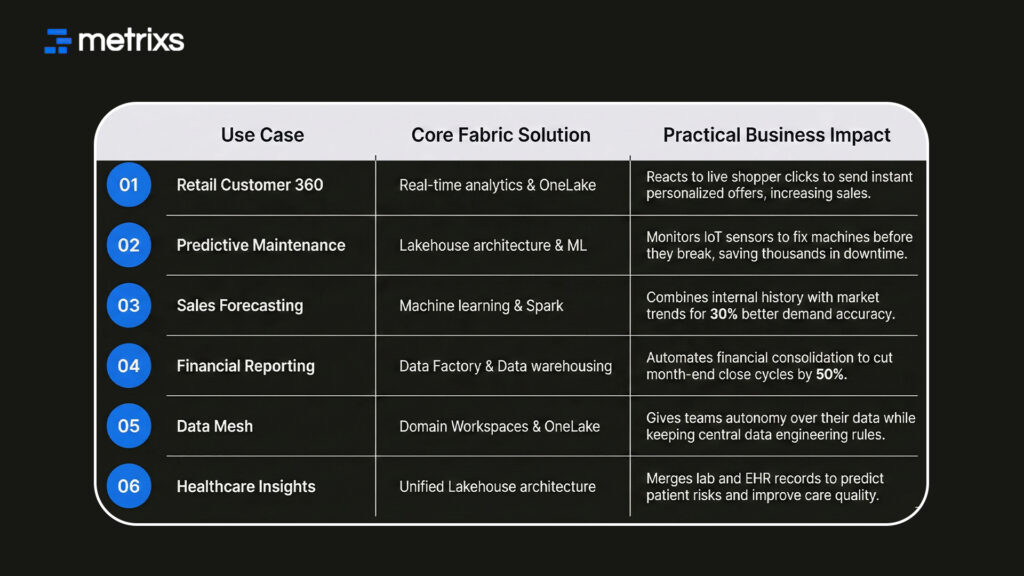
These use cases prove that a unified system handles complex tasks better than scattered tools.
When to Migrate from Traditional BI to Fabric – Decision Framework
Deciding when to start your traditional BI migration depends on your current data pains. If your systems feel slow or disconnected, you likely need a new approach. These microsoft fabric use cases help you decide if now is the right time for data modernization.
Migrate to Fabric When:
You should move to a unified platform if your data volume exceeds a terabyte. Most teams find that old tools cannot handle that much weight. You need microsoft fabric use cases if you face these issues:
- You require real-time analytics to make fast decisions.
- Your data engineering team spends too much time moving data between silos.
- You want to use machine learning models without exporting files.
- You need a single OneLake storage system to cut costs. A traditional BI migration solves these problems by putting everything in one place. It allows you to build a lakehouse architecture that grows with your business.
Stay with Traditional BI When:
Sometimes you should wait to start your data modernization journey. If your setup is simple, you might not need microsoft fabric use cases yet.
- You have fewer than 50 users.
- You only need basic descriptive reports.
- You don’t have a team to manage data engineering tasks. If your current tools meet every need, stay where you are for now.
Hybrid Approach:
A phased Power BI migration is the most common path. You keep your existing reports while building new microsoft fabric use cases on the side. This lets you test the lakehouse architecture without stopping your daily work. It makes your data modernization process much safer.
This framework ensures you move at a pace that fits your team. Next, we look at how to speed up this change with expert help.
Accelerate Your Transition from Legacy BI to Microsoft Fabric with Metrixs
Metrixs helps you get the most value from your microsoft fabric use cases by focusing on your ERP data. We specialize in data modernization for Microsoft Dynamics 365 Finance & Operations.
Use our tools to turn raw numbers into a unified view of your data warehousing performance.
- Fast Setup: Start your traditional BI migration in under six weeks.
- Live Snapshots: Get instant trends for better supply chain analytics decisions.
- Global Scale: Track multiple currencies for consistent financial consolidation reporting.
- Automation: Reduce manual work by automating your balance sheets in OneLake.
We ensure your data engineering efforts lead to a 15% reduction in costs. Metrixs makes your microsoft fabric use cases simple and effective → Metrixs
Conclusion
Microsoft Fabric improves operations through microsoft fabric use cases like real-time analytics and OneLake. Sticking to slow, manual tools creates messy silos that hide the truth about your business.
If you delay your traditional BI migration, you risk making blind decisions while faster rivals steal your market share. This data gap leads to wasted capital and missed targets.
Metrixs automates your data modernization to stop these losses. We deploy specific microsoft fabric use cases for your ERP data to ensure you stay ahead and keep your data accurate and actionable.
Connect to Metrixs to simplify your microsoft fabric use cases and accelerate your traditional BI migration for a smarter data modernization strategy.
FAQs
1. What are the top Microsoft Fabric use cases delivering measurable ROI across industries?
High-impact microsoft fabric use cases include real-time analytics for retail and supply chain analytics for manufacturing. By using a lakehouse architecture in OneLake, firms achieve a 379% ROI. These microsoft fabric use cases improve data engineering speed and your overall data modernization results.
2. When should organizations migrate from Power BI to Microsoft Fabric versus staying with traditional BI?
Start a traditional BI migration when your data exceeds one terabyte or requires machine learning. If you need real-time analytics and a unified lakehouse architecture, microsoft fabric use cases fit best. Stay with old tools if your reporting needs remain very basic.
3. What are the realistic timelines and effort for migrating from Power BI to Fabric?
A standard traditional BI migration takes four to twelve weeks. Simple microsoft fabric use cases move faster using OneLake shortcuts. Your data modernization timeline depends on your data engineering complexity and the number of data warehousing assets you need to move today.
4. What are common migration challenges and how do organizations overcome them?
Most teams struggle with data engineering skill gaps during a traditional BI migration. Overcome this by testing microsoft fabric use cases in a pilot program. Focus on OneLake integration to simplify your data modernization and ensure your data warehousing performance stays high.
5. How do organizations justify Fabric investment to finance and executive leadership?
Show leaders that microsoft fabric use cases deliver a 379% ROI through better data engineering efficiency. A traditional BI migration cuts costs by consolidating tools into OneLake. This data modernization proves its value by speeding up real-time analytics and business growth.
6. What role does Microsoft Power BI play within Microsoft Fabric ecosystem?
Power BI acts as the primary visualization layer for all microsoft fabric use cases. It connects directly to OneLake using a lakehouse architecture for faster reporting. This keeps your traditional BI migration simple while adding real-time analytics and better data engineering tools.

