


Most finance teams miss a massive opportunity. While FP&A Power BI connects to 900+ data sources like ERP and CRM systems, many analysts still export data to Excel before planning.
This manual step slows you down. Today, FP&A Power BI models handle budgeting and long-range scenarios with ease. The global BI market grows every year as teams move to continuous reporting.
Integrated financial planning and analysis dashboard tools give you faster access to data than old spreadsheets. New Copilot features even let you query models using simple English. Here is how these models will work in 2026.
The Core FP&A Power BI Model Structure Finance Teams Use in 2026
Building a production-grade FP&A Power BI model requires more than just connecting to a database. You need a structured approach that separates historical truths from future assumptions.
We ensure your financial planning and analysis dashboard remains fast, accurate, and easy for your leadership team to understand.
1. Actuals Reporting Layer: P&L, Cash Flow, and Balance Sheet
Your model starts with the historical layer. Here, FP&A Power BI structures your P&L, cash flow, and balance sheet into a “long” data format. This design allows you to use the same calendar table and DAX measures across all three statements.
Controllers use this layer for month-end close reports and cost center tracking. By centralizing these views, you ensure that every department looks at the same version of the truth.
2. Driver-Based Forecasting Layer
The second layer connects your plans to operational reality. Instead of using flat percentage increases, FP&A Power BI links revenue to CRM pipeline data and payroll to HR headcount.
You use “what-if” parameters to adjust drivers like sales growth or interest rates. When you change a driver, the entire financial planning and analysis dashboard updates instantly.
This method makes your Power BI budgeting and forecasting process much more resilient because it reflects how your business actually operates day-to-day.
3. Forecast vs. Actuals Variance Layer
Variance analysis identifies why your performance shifted. Modern FP&A Power BI models use waterfall charts with dynamic legends to show scenario labels clearly. This replaces the manual notes often found in Excel.
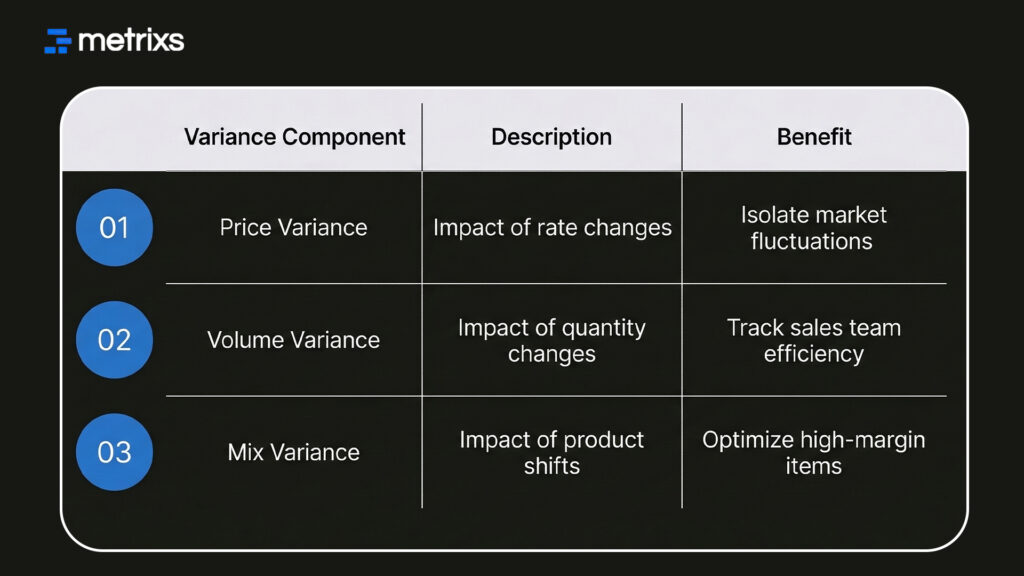
These layers build the foundation for faster decision-making across your entire organization.
Where Power BI Budgeting and Forecasting Visibly Improves Planning
Traditional planning often feels like looking in the rearview mirror. Using FP&A Power BI shifts your focus forward by automating the data heavy lifting. This gives your team more time to analyze results instead of just cleaning data.
1. Scenario Modeling at Speed
In the past, building a new “What-If” plan meant copying a massive Excel file. With FP&A Power BI, you use what-if parameters to test new ideas instantly.
- Adjust revenue drivers like units sold or average price.
- Test cost assumptions such as headcount changes or inflation.
- Review impacts on your financial planning and analysis dashboard in seconds.
- Compare versions side-by-side without opening multiple files.
2. Multi-Entity and Multi-Currency Planning
If you manage several regions, FP&A Power BI simplifies consolidation. Calculation groups apply currency logic across your entire model without creating hundreds of extra formulas.
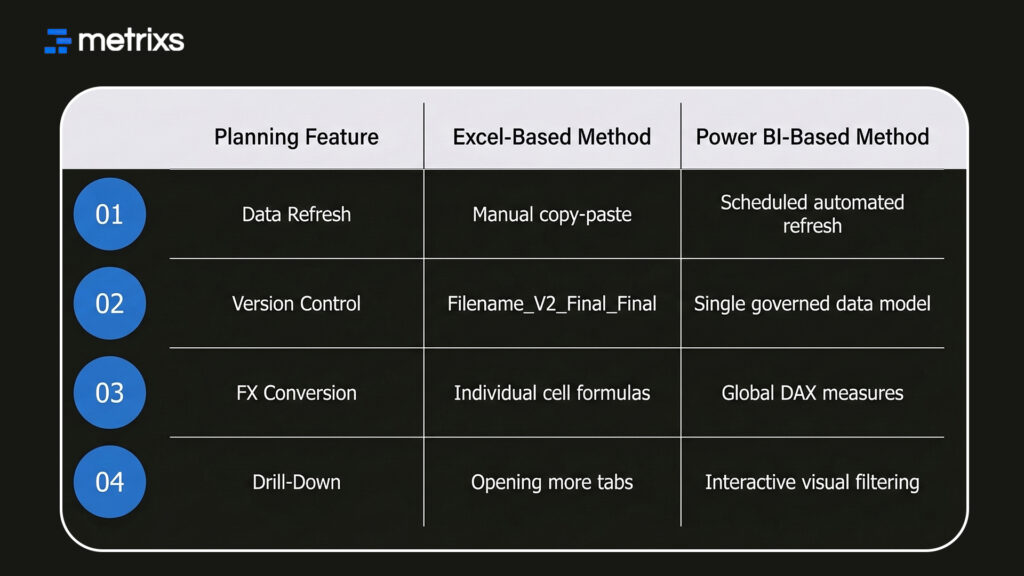
This structure makes your Power BI budgeting and forecasting reliable enough for the boardroom. However, even the best tools fail if you build them on a weak foundation.
What FP&A Teams Get Wrong When Building Power BI Planning Models
Avoiding structural mistakes ensures your Power BI budgeting and forecasting stays fast as your data grows. If you ignore data modeling basics, your reports will eventually lag or show incorrect numbers.
1. Using Report-Level Filters Instead of DAX Logic for Scenario Control
Most users start by using standard report filters to switch between a “Base” and “Upside” plan. This works for one chart but breaks when you need to see both scenarios in a single waterfall visual. Calculation groups solve this by keeping your FP&A Power BI model clean.
- Define logic once using a single DAX measure.
- Compare scenarios side-by-side in any matrix or chart.
- Reduce model size by avoiding duplicate formulas.
- Improve performance during heavy Power BI budgeting and forecasting cycles.
2. Skipping Semantic Model Governance in Shared Environments
The November 2025 update for FP&A Power BI introduced remote MCP Server connectivity for a reason. Without governance, different analysts create different versions of “Gross Margin,” leading to “logic drift.”
Using these DAX measures and governance tools keeps your data trustworthy. Specialized platforms can take this efficiency even further by automating the most difficult parts of the setup.
How Metrixs Strengthens FP&A Planning Visibility Beyond Standard Power BI Models
Metrixs improves your FP&A Power BI strategy by connecting directly to Microsoft Dynamics 365. It transforms raw ERP numbers into a clear financial planning and analysis dashboard.
You get 80% faster reporting and 99.9% accuracy with 1,000+ pre-built metrics.
- Rapid Integration: Full FP&A Power BI setup in six weeks.
- Data Snapshots: Capture trends for proactive Power BI budgeting and forecasting.
- Multi-Region Flexibility: Track many currencies for better planning visibility.
- Financial Oversight: Automate balance sheets for real-time control.
Metrixs turn your ERP into a competitive advantage. Let’s explore Metrixs today.
Conclusion
Modern FP&A Power BI models turn static data into interactive insights, giving your team the planning visibility needed to stay agile. However, many organizations struggle with fragmented data sources and inconsistent logic across their financial planning and analysis dashboard.
Relying on broken models or manual workarounds creates a dangerous situation where your leadership makes high-stakes decisions based on inaccurate projections. One bad forecast could lead to missed growth targets or severe cash flow shortages.
Metrixs solves these structural gaps by automating your Power BI budgeting and forecasting, ensuring your data remains a reliable asset instead of a liability.
Let’s connect with Metrixs and transform your FP&A Power BI strategy into a high-performance financial planning and analysis dashboard today.
FAQs
1. What is FP&A Power BI used for?
FP&A Power BI automates your complex budgeting and forecasting by connecting directly to ERP and CRM data. This financial planning and analysis dashboard provides instant planning visibility into P&L and cash flow. Analysts use DAX measures and scenario analysis to replace manual spreadsheets.
2. How does it improve Power BI budgeting and forecasting?
A Power BI budgeting and forecasting model uses driver-based planning to link projections to operational inputs. By utilizing what-if parameters, finance teams run scenario analysis instantly. This creates a dynamic financial planning and analysis dashboard that improves accuracy and speeds up reporting.
3. Why use DAX measures in finance?
DAX measures are essential for FP&A Power BI because they calculate complex KPIs like variance analysis and rolling forecasts dynamically. Unlike Excel, these formulas are central and reusable, ensuring your financial planning and analysis dashboard remains consistent across every board report and entity.
4. What are calculation groups in finance models?
In an FP&A Power BI model, calculation groups allow you to apply specific logic across multiple DAX measures. This is vital for Power BI budgeting and forecasting, enabling side-by-side scenario analysis and currency conversion without cluttering your data model or your visuals.
5. How does ERP integration help financial planning?
ERP integration ensures your FP&A Power BI model pulls live data directly from the source system. This eliminates manual exports, reduces errors in your financial planning and analysis dashboard, and provides the planning visibility needed for continuous, real-time Power BI budgeting and forecasting.

