


Finance teams finish a financial close every month. Most teams do not realize what broke until auditors find it later. Currently, only 18% of teams hit a three-day target. Close cycle delays usually start with bad data.
These financial close process failures cost time and trust. The close checklist marks tasks as finished. It often misses incorrect numbers. You need better data visibility to catch problems before they scale. Here is how you fix your financial close.
The Month-End Close Errors Finance Teams Can’t See Until It’s Too Late
The most expensive financial close mistakes do not stop the process. They let you finish with wrong numbers. You need real-time data visibility to catch these hidden month-end close errors before they reach your final reports.
A) Errors That Pass Approval Gates
Journal entry errors often post without issue if no validation rule flags them. They clear your close checklist because the entry exists. However, your financial close remains at risk because the system cannot tell if the entry is right. This leads to financial close process failures that only auditors find later.
B) The Silent Mismatch in Reconciliations
Subledger reconciliation gaps stay hidden when teams use manual spreadsheets. Finance staff often write off small differences to avoid close-cycle delays. This “plug” becomes a permanent error in the financial close. Without a proper account reconciliation tool, these gaps carry forward into the next period.
C) Cutoff Errors That Inflate Revenue
Cutoff errors record revenue in the wrong period. These happen when ERP data gaps exist between source systems and the ledger. Manual review often misses a transaction dated the 31st that belongs on the 1st. These month-end close errors are a primary cause of financial restatements.
Your team marks tasks as finished, but the audit trail shows the underlying data is flawed. Understanding where these errors hide helps you identify where the financial close actually breaks first.
Where the Financial Close Process Actually Breaks First
Four specific areas cause the financial close to fall apart. These financial close process failures usually stay hidden until they cause a massive delay. You need to identify these month-end close errors before they hit your consolidated reports.
A) Intercompany Mismatches That Block Consolidation
Intercompany mismatches are the top bottleneck for multi-entity firms. One entity records a transaction while the other misses it. This stops the financial close until someone manually traces the gap through different systems. It is a data problem that leads to significant closed-cycle delays.
B) ERP Data Gaps That Force Manual Work
ERP data gaps happen when subsidiaries use different software. Finance staff then copy and paste data into spreadsheets.
- Manual entry introduces journal entry errors.
- Version control breaks the moment the ERP updates.
- Fragmented systems make a clean account reconciliation nearly impossible.
C) Missing Data From Other Departments
The financial close depends on data you do not control. Procurement, HR, and operations often send late or messy files. This dependency makes your close checklist stall. These financial close process failures are actually flow problems rather than communication issues.
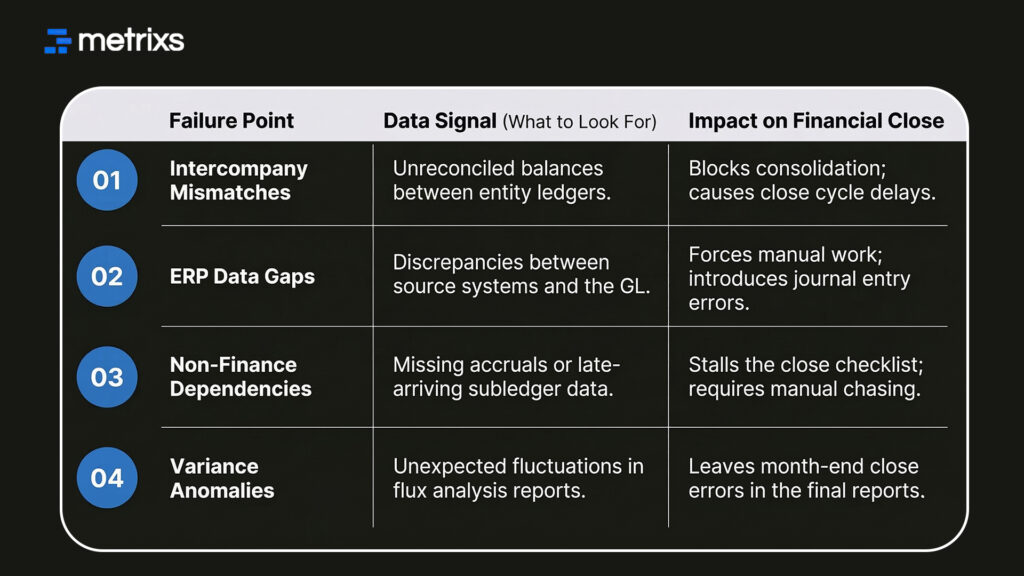
D) The Variance Nobody Investigates
A proper variance analysis should catch anomalies early. In a manual financial close, this step happens last. You often document a variance as “under investigation” just to finish on time. This leaves month-end close errors in your books until the next period.
Most teams struggle because they lack data visibility into these four areas. Shifting to real-time tracking helps you catch these breaks while they are still cheap to fix.
What Data Actually Exposes During the Financial Close
Most close problems are visible in your numbers long before they stop your team. The issue is that the data isn’t being read at the right time. You need data visibility to turn these signals into solutions.
1. Real-Time Exception Flags
AI-driven tools analyze historical patterns across your accounts. This helps catch journal entry errors before they post.
- Duplicate entries get flagged instantly.
- Missing accruals show up as anomalies.
- Unusual expense spikes appear during the financial close, not after.
This changes how you handle month-end close errors. Instead of a post-close review, you resolve exceptions while the window is still open.
2. Audit Trail Gaps and Scrutiny
An audit trail gap occurs when approvals happen via email or chat. This doesn’t stop the financial close, but it fails the audit months later. Data-connected platforms log every action automatically. This eliminates the manual documentation effort that often causes close cycle delays.
3. Consolidation Distortion and Mismatches
Intercompany mismatches often stay hidden in consolidated revenue. These distortions pass internal review because the totals look “reasonable.” However, they fail the account reconciliation test during a regulatory review. Automated platforms catch these financial close process failures before they reach the final statements.
Data exposes the cracks in your financial close if you have the right tools to see them. This shift from manual hunting to automated alerts ensures a cleaner, faster result.
How Metrixs Surfaces Financial Close Failures Before They Escalate
Metrixs provides advanced analytics for Microsoft Dynamics 365, turning raw ERP data into a clear view of your financial close performance. It eliminates month-end close errors and manual silos with 99.9% accuracy.
- Rapid Integration: Deploy in under six weeks for a faster financial close.
- On-Demand Snapshots: Use historical trends for proactive financial close process failure prevention.
- Multi-Region Flexibility: Track multiple currencies to ensure consistent global reporting.
- Centralized Oversight: Automate balances to maintain a real-time view of your financial close.
Metrixs ensures your financial close runs at 80% higher speeds while reducing operational costs by 15%. Explore how Metrixs ensures you use your ERP to its full advantage and simplifies your financial close process.
Conclusion
Your financial close often hides structural failures in your data. Month-end close errors like intercompany mismatches create a fragile foundation. When financial close process failures reach your final reports, you face restatements. You risk audit failures. Leadership trust disappears. These close cycle delays hurt your compliance standing.
Metrixs gives you the data visibility to catch breaks early. Use automated account reconciliation to ensure 99.9% accuracy during the financial close. Perform variance analysis before the books officially close.
Connect to Metrixs to find every hidden failure before your books close and ensure your data stays accurate every month.
FAQs
1. What are the most common financial close errors and where do they originate?
Most month-end close errors originate in manual spreadsheets. These include journal entry errors, intercompany mismatches, and cutoff issues. Such financial close process failures often stay hidden. They trigger close-cycle delays and force you to reopen books after completion.
2. Why do financial close errors often go undetected during the close itself?
A closed checklist only confirms a task is finished. It misses underlying journal entry errors. Without real-time data visibility, these financial close process failures move through your system. You only find them during a late-stage audit trail or variance analysis.
3. How does intercompany reconciliation failure affect the broader financial close?
Intercompany mismatches stop the consolidation process. When entities do not match, close cycle delays occur instantly. Resolving these financial close process failures requires manual tracing. Automated account reconciliation helps you catch these gaps before they block your entire financial close.
4. What does “audit trail gaps” mean in the context of financial close?
An audit trail gap happens when approvals occur via email. This creates ERP data gaps in your records. While the financial close finishes, you lack proof for auditors. This turns a simple account reconciliation issue into a major compliance failure.
5. How can data visibility shorten the financial close cycle?
Strong data visibility helps you resolve exceptions while the financial close is active. Automated alerts catch journal entry errors early. This reduces close-cycle delays. Teams using these tools often finish a financial close in under six days.
6. How does Metrixs reduce financial close errors in Dynamics 365 environments?
Metrixs connect to D365 to provide 99.9% accuracy. It eliminates ERP data gaps that cause month-end close errors. By automating account reconciliation and variance analysis, it stops financial close process failures from reaching your final reports.

