

Modern companies waste data because it stays stuck in their systems. The embedded analytics market hit $22 billion last year. Smart leaders now use ERP analytics to stay ahead.
Most businesses fail here because they pick the wrong analytics software. 66% of projects don’t pay off. You must choose a platform that fits your actual work. This guide helps you compare five top ERP analytics options.
You’ll see which business intelligence tools work for your team. We want to help you find the best fit for your specific business goals today.
5 ERP Analytics Platforms Evaluated
Choosing the right ERP analytics tool depends on how your team uses data. Some teams need high-end visuals, while others need fast financial reports. Here is the first platform to consider for your business intelligence needs.
1. Tableau – Best-in-Class Data Visualization
Tableau leads the data analytics world with its powerful engine. It connects to many ERP reporting tools and turns messy data into clear visuals. It works well if you have complex data and need deep data visualization options.
Key Features:
- Advanced Data Visualization: You can create detailed ERP dashboards that allow users to see patterns through interactive charts and maps.
- Data Integration: It links with over 70 sources, making it a strong BI platform for companies with multiple software systems.
- Natural Language Queries: Users can ask questions in plain English to get instant answers from their data.
- Mobile Access: You can view your real-time analytics on any device with a consistent look and feel.
Best for: Organizations that need high-end data visualization and have dedicated data analysts to manage the system.
Implementation time: 4-8 weeks.
Pick a platform that matches your team’s skills to ensure high analytics maturity.
2. Metrixs – Purpose-Built ERP Analytics and Financial Consolidation
Metrixs focuses on ERP analytics for finance teams. It connects directly to your system to automate data analytics and reporting. This analytics software helps you skip manual work and get straight to accurate financial results.
Key Features:
- Pre-configured ERP Connectors: This tool links with 70+ systems like SAP and NetSuite, acting as an effective data integration hub.
- Automated Financial Consolidation: It merges data from different entities automatically, which is a major part of ERP reporting tools.
- Real-time Analytics: You get live updates on your financial health through specialized ERP dashboards.
- Embedded Analytics: It fits right into your existing work steps so you don’t have to switch apps to see numbers.
Best for: Finance leaders who need fast data visualization of their ERP analytics and automated multi-entity reporting.
Implementation time: 2-4 weeks.
3. Power BI – Microsoft Ecosystem Leaders
Power BI dominates organizations that already use Microsoft tools. It connects directly to your data analytics stack and offers a familiar feel for Excel users. This BI platform makes it simple to share real-time analytics through Teams and other Office apps.
Key Features:
- Seamless Microsoft Integration: It links perfectly with Azure and Dynamics 365, making data integration easy for existing Microsoft shops.
- AI-Powered Insights: You can use predictive analytics and natural language tools like Copilot to find trends without writing complex code.
- Cost-Effective Entry: With prices starting around $10 per user, it is an affordable analytics software for teams of all sizes.
- Interactive Dashboards: Users can build custom ERP dashboards using a simple drag-and-drop interface.
Best for: Companies already using Microsoft 365 that want an affordable and easy-to-use business intelligence solution.
Implementation time: 3-6 weeks.
4. Qlik Sense – Associative Analytics Specialist
Qlik Sense uses a unique engine to find hidden patterns in your ERP analytics data. It links all your sources without query limits. This analytics software handles large datasets well and provides fast data visualization for complex business questions.
Key Features:
- Associative Data Model: Users can explore their ERP analytics in any direction. The system shows related and unrelated data clearly, helping you find unexpected insights in your business intelligence reports.
- Self-Service Data Preparation: It includes strong tools for cleaning and merging data from different ERP reporting tools without needing a separate ETL system.
- Augmented Analytics: The platform uses AI to suggest new ERP dashboards and insights based on how you interact with your data analytics apps.
- Hybrid Cloud Flexibility: You can deploy it on-site or in the cloud while keeping your real-time analytics fast and secure across the whole company.
Best for: Organizations with large-scale data and users who need to perform deep, exploratory ERP analytics across many departments.
Implementation time: 5-8 weeks.
5. Looker – Google Cloud Native Analytics
Looker is a cloud-native solution that belongs to the Google Cloud family. It uses LookML to create a single version of truth. This platform connects directly to your database to provide live data analytics insights for your ERP analytics strategy.
Key Features:
- LookML Semantic Layer: This unique modeling language ensures everyone uses the same definitions for their ERP analytics metrics, preventing data silos.
- Embedded Analytics: You can build custom data apps or put ERP dashboards directly into your internal tools using its strong API.
- Real-Time SQL Action: It queries your warehouse directly in SQL, meaning your business intelligence reports always show the most current numbers.
- Google Cloud Synergy: It works perfectly with BigQuery and other Google services, making it a powerful choice for modern data analytics stacks.
Best for: Cloud-first companies and tech teams that want to embed ERP analytics into their own products or workflows.
Implementation time: 6-10 weeks.
Comparison Matrix and Platform Selection Guidance (220-240 words)
Selecting the right ERP analytics platform requires balancing speed, cost, and depth. If your team is already deep into Microsoft Teams and Excel, Power BI is the natural choice for business intelligence. However, if you need to merge data from five different international subsidiaries by Friday, the specialized financial logic in Metrixs will save you weeks of manual data integration.
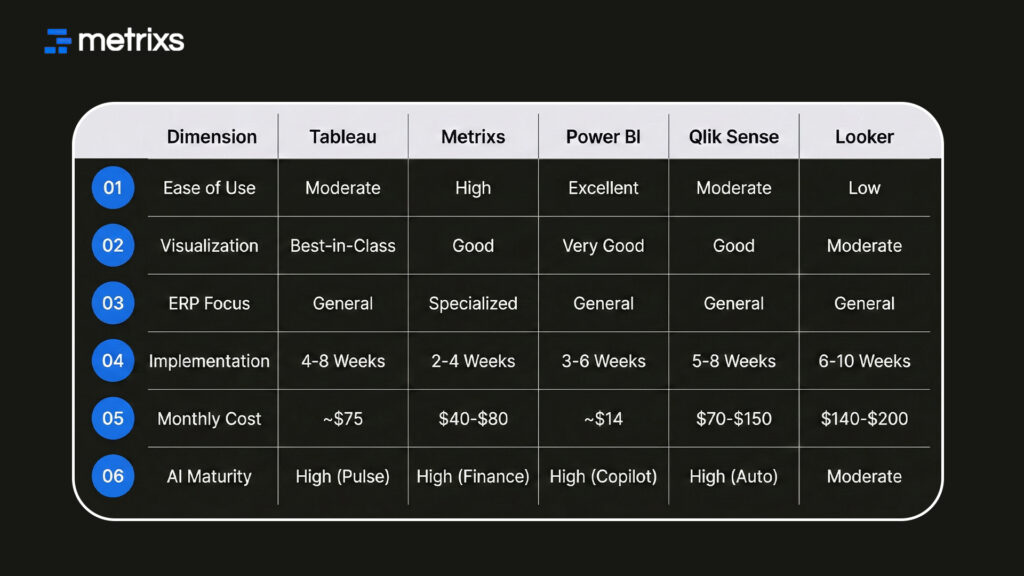
The following matrix compares how these five leaders perform across key business metrics for 2026.
Selection Strategy:
- Visual Storytelling: Tableau offers the most creative freedom for complex data visualization.
- Rapid Financial ROI: Metrixs delivers pre-built ERP reporting tools for faster results.
- Low-Cost Scale: Power BI provides the best value for business intelligence within the Microsoft stack.
- Complex Data Discovery: Qlik Sense handles deep data analytics across massive, unstructured datasets.
- Developer-Led Apps: Looker is ideal for building custom embedded analytics into your own products.
Focus on how each tool handles your specific data analytics workload to improve your analytics maturity.
How Metrixs Outshines Other Vendors in the ERP Analytics Space
Metrixs offers the world’s most advanced ERP analytics for Microsoft Dynamics 365. It consolidates data seamlessly and turns raw numbers into a clear view of performance.
With 1,000+ metrics, Metrixs enables 80% faster reporting with 99.9% accuracy. This business intelligence solution ensures your system serves as a growth engine.
Key Strengths:
- Fast Integration: Start your data analytics journey in under six weeks with no disruption.
- Live Snapshots: Capture inventory flows for proactive ERP analytics decisions and better planning.
- Global Flexibility: Track multiple currencies effortlessly for consistent reporting across all regions.
- Centralized Oversight: Automate financial summaries to maintain a real-time view of your results.
Metrixs simplifies your workflow so you can scale efficiently and focus on growth.
Ready to turn your data into a clear roadmap for growth? Explore how Metrixs simplifies your ERP analytics today.
Conclusion
Picking an ERP analytics platform is a high-stakes move for your team. You face messy data silos and high costs that drain your budget. When implementations fail, you risk losing millions and stalling your growth.
This pressure can feel like a dead end for your business intelligence goals. Metrixs solves this by offering a direct, pre-built path for your data analytics. It removes the fear of failure by connecting your systems in weeks. You get clear results without the usual technical headaches or wasted resources.
Ready to see how fast your reporting can change? Book a free demo with Metrixs today.
FAQs
1. What are the most critical evaluation criteria when selecting ERP analytics platforms?
Evaluate ERP analytics by how well the system fits your unique workflow and goals. Check if the analytics software offers easy data integration. High-quality data visualization and predictive analytics help your team reach high analytics maturity levels very quickly and accurately.
2. How do Tableau, Power BI, Qlik, Looker, and Metrixs compare for ERP analytics specifically?
Each BI platform has its own strengths. Tableau leads in data visualization, while Metrixs offers the best ERP reporting tools for finance. Power BI provides affordable business intelligence. Look for embedded analytics and real-time analytics to keep your ERP dashboards current.
3. What percentage of ERP analytics implementations succeed versus fail, and what causes failures?
Recent 2026 data shows 70% of ERP analytics projects struggle. Failures happen when the analytics software doesn’t match business needs. Successful teams prioritize data integration and business intelligence training. This approach builds real-time analytics confidence and ensures long-term analytics maturity.
4. How long does typical ERP analytics implementation take and what factors influence timeline?
Typical ERP analytics setups take 4 to 12 weeks. Specialized analytics software like Metrixs cuts this to under a month. Complex data analytics projects with heavy data visualization needs take longer. Faster data integration leads to quicker real-time analytics and business results.
5. How do you justify ERP analytics investment to finance and executive leadership?
Justify ERP analytics by showing clear cost savings. Automated ERP reporting tools reduce manual work by 30%. Use predictive analytics to optimize inventory. Better business intelligence through custom ERP dashboards improves decision speed. This helps your company reach full analytics maturity.
6. What ongoing support, training, and maintenance requirements should organizations budget for?
Budget 20% of your initial cost for yearly ERP analytics support. This covers BI platform updates and data analytics training. Regular maintenance keeps your embedded analytics and real-time analytics sharp. Ongoing data integration checks prevent errors in your critical ERP dashboards.

