


Finance teams feel the pressure when Dynamics NAV reporting slows every close cycle. You extract data, fix broken sheets, chase numbers across modules, and hope the final report holds up under review.
Most teams repeat the same steps month after month, and the workload grows as more entities and more data enter the system. These issues hit accuracy, timing, and confidence.
You want clean numbers, real-time visibility, and fewer surprises. Metrixs supports teams stuck in this loop by helping them cut manual work and move faster with reliable data.
This blog breaks down the six reporting problems tied to Dynamics NAV reporting, why they show up so often, and how they impact financial consolidation challenges for growing companies.
Problem 1: Heavy Reliance on Excel for Custom Reports
Most teams discover early that Dynamics NAV reporting can’t match the pace or detail of their business needs. Once you try to adjust formats, build deeper insights, or create new views for leadership, you run into limits that slow everyone down.
A) When NAV’s Standard Reports Miss the Mark
Default reports handle basic summaries, but they fall short when you need flexibility. You can’t shape layouts fast or support new calculations without extra steps. As expectations grow, NAV’s rigid structure creates report customization complexity, so Excel becomes the fallback for almost every update. Over time, this builds deeper Excel dependency in reporting.
B) The Hidden Cost of Spreadsheet Reporting
Working in spreadsheets seems harmless until the errors show up. Teams often deal with:
- Version confusion across folders
- Broken formulas when sheets grow
- Manual consolidation work that delays updates
- More effort on cleanup than automated financial reporting
These manual steps interrupt automated financial reporting and force analysts to spend more time fixing sheets than using strong reporting tools for NAV. During peak periods, this slows progress across departments.
Once you add financial consolidation challenges, Dynamics NAV reporting becomes harder to manage month after month. This leads directly to the next issue: slow reconciliation.
Problem 2: Slow and Cumbersome Reconciliation Processes
Reconciliation should be quick, but Dynamics NAV reporting makes it slow and repetitive. You spend more time checking gaps than confirming accuracy.
A) Manual Matching That Eats Days Off Your Close
You follow the same steps each month because the system doesn’t surface mismatches fast:
- Compare balances across modules.
- Trace entries line by line to find differences.
- Confirm totals in subledgers.
- Check bank statements against NAV.
- Review intercompany entries for errors.
Tasks like subledger checks and intercompany reconciliation NAV become manual investigations instead of quick validations. Each delay adds pressure during the month-end and stretches timelines because the system doesn’t guide you to the root cause.
B) Why Automation Matters Here
When teams track open items in spreadsheets, those sheets become part of the workflow. This reduces financial data visibility and slows automated financial reporting.
As organizations add more entities, the workload increases. Teams dealing with financial consolidation challenges feel this even more because each mismatch takes longer to resolve.
These recurring delays show that Dynamics NAV reporting can’t support a fast close when manual work stacks up. This sets the stage for the next issue: the complexity of multi-entity consolidation.
Problem 3: Multi-Entity Consolidation Complexity Without Built-In Solutions
Companies with several entities expect NAV to combine results smoothly, but Dynamics NAV reporting doesn’t give you a built-in structure for fast consolidation. Each cycle, your team gathers trial balances, aligns formats, and checks data manually before reviewing results.
A) Consolidating Across Subsidiaries and Legal Entities
Different entities use different layouts, which adds more steps. You handle chart of accounts mapping, ownership checks, and adjustments for entries that don’t match. Growth makes this harder because each new entity introduces more variations.
Multi-entity consolidation becomes slow since NAV doesn’t automate these steps or support quick NAV data consolidation. You depend on spreadsheets and manual checks to keep numbers aligned.
B) Currency Conversion and Elimination Entries
When entities use different currencies, you calculate conversions by hand. You create elimination entries, review intercompany balances, and repeat the same process each month. NAV doesn’t automate these tasks, so the workload grows with each cycle. These gaps get bigger as financial consolidation challenges increase.
Without stronger support, Dynamics NAV reporting turns consolidation into a demanding task. Metrixs often hears from teams who say this is where the close slows the most. Next comes an issue many teams feel early: RDLC report development.
Problem 4: RDLC Report Development Requires Technical Expertise
Teams often assume report updates will be simple, but Dynamics NAV reporting becomes restrictive the moment you try to adjust a layout or add new fields. RDLC reports rely on technical steps that analysts can’t complete on their own, so even small changes turn into developer tasks.
A) Report Customization Demands Developer Resources
RDLC follows a structure that doesn’t support quick edits. A typical update involves steps like
- Changing datasets before layout edits
- Adding or mapping new fields
- Fixing layout limitations after updates
- Adjusting grouping or filters
- Testing the final output across formats
These steps slow teams down because RDLC doesn’t support flexible changes. As requests rise, Dynamics NAV reporting becomes harder to maintain without IT support.
B) RDLC Limitations Your Finance Team Encounters
RDLC restricts headers, grouping, and conditional elements. Any dataset change forces you to rebuild layout sections. These limits create report customization complexity and push teams toward external reporting tools for NAV. As your reporting scope grows and financial consolidation challenges increase, delays become more noticeable.
These constraints explain why Dynamics NAV reporting feels heavier than expected. Next comes another common issue: limited real-time visibility.
Problem 5: Lack of Real-Time Financial Visibility and Data Accuracy
Finance leaders expect fast answers, but Dynamics NAV reporting often delivers numbers that lag behind real activity. The system handles transactions, but pulling fresh insights takes extra steps, manual checks, and several exports.
When leaders ask for an updated cash view or spending trend, you often rebuild the data instead of retrieving it instantly.
A) The Data Lag Problem
NAV processes entries, but it doesn’t provide the real-time financial insights teams need. You run queries, export results, and verify them across modules before sharing anything.
These steps interrupt automated financial reporting and slow decisions across the business. The pressure grows during the month-end, when timing matters most. Teams lose hours confirming balances that should already be visible inside the system.
B) Data Quality and Audit Trail Gaps
When questions arise, getting the full story takes time. NAV doesn’t make audit trails easy to interpret, so you search logs, track changes manually, or validate entries through separate reports. These gaps increase data accuracy issues, especially for companies managing several entities. As financial consolidation challenges increase, the lack of quick NAV data visibility becomes more noticeable.
These limitations show why Dynamics NAV reporting struggles to support fast, confident decisions. The next issue builds on this one: limited analytics and drill-down capability.
Problem 6: Limited Drill-Down and Analytics Without Third-Party Tools
Finance teams expect quick answers, but Dynamics NAV reporting often limits how deep you can go. When leaders ask for explanations behind a variance or a shift in spending, you can’t jump from a summary to the exact transaction inside NAV.
A) Disconnected Reporting and Analysis
Drill-down limitations turn simple checks into long reviews. You export data, scan lists, and compare numbers across modules because NAV doesn’t support smooth NAV data visibility.
Reports stay static, and any change forces another export. As your structure grows, these issues compound, especially when several teams rely on the same data.
B) Business Intelligence Disconnects
Many companies depend on Power BI, but dashboards only work when the source stays aligned. When numbers change in NAV, the dashboards fall out of sync, creating confusion about which version is correct.
Teams managing financial consolidation challenges feel this even more because they need insights across multiple entities, not a single workbook. These issues disrupt automated financial reporting and create more manual work across departments.
These gaps show why Dynamics NAV reporting often falls short for deeper analysis. Next, we cover how Metrixs solves these limitations with stronger automation.
6 Dynamics NAV Reporting Problems:
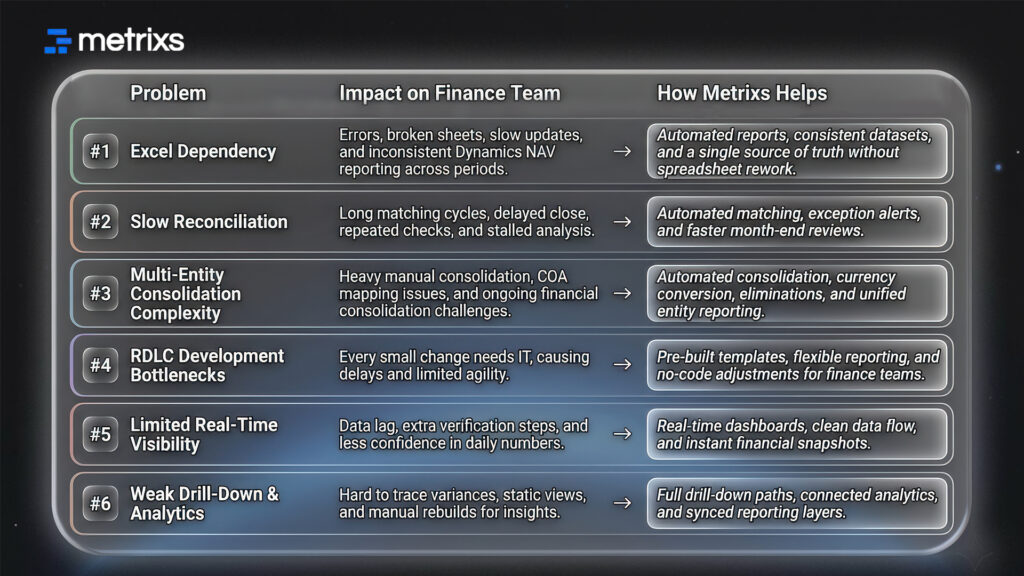
How Metrixs Can Help You Transform NAV Reporting
Metrixs brings advanced analytics and reporting clarity to companies that struggle with Dynamics NAV reporting. It replaces manual work with automated insights, giving finance teams a unified view of performance across entities, periods, and accounts.
Instead of rebuilding sheets or reconciling mismatched numbers, you get a single source of truth designed to fix the gaps that slow month-end cycles. With strong consolidation logic, deep automation, and real-time financial insights, Metrixs helps teams handle NAV data consolidation, reconciliation, and close activities with confidence.
Key Strengths:
- Rapid Integration: Go live in under six weeks with a smooth setup that supports better Dynamics NAV reporting without disrupting daily work.
- On-Demand Data Snapshots: Track trends, spending shifts, and operational changes instantly for stronger decisions.
- Multi-Region Flexibility: Manage currencies and units easily to support global reporting and remove financial consolidation challenges.
- Centralized Financial Oversight: Automate summaries and statements to reduce manual steps and improve visibility.
- Measurable Impact: Smart insights cut operational costs and strengthen your reporting strategy.
Metrixs turns Dynamics NAV reporting into a stronger system that supports fast decisions and consistent results. Reach out to Metrixs to remove manual work from your close cycle.
Conclusion
Dynamics NAV reporting works well for transactions, but finance teams often feel pressure when they need fast insights. Month-end slows because tasks repeat, reconciliation takes longer than expected, drill-downs are limited, and financial consolidation challenges add more steps.
When reports depend on manual work, numbers become harder to align, and teams lose time confirming details instead of focusing on decisions. Even small delays can shift timelines and create uncertainty for leaders waiting on updates.
Metrixs supports teams by giving them a clearer reporting flow, automated checks, and stronger consolidation without replacing their ERP. It keeps the process simple while helping finance teams move through each cycle with more confidence and less manual effort.
Book a demo with Metrixs to see how your reporting can move faster.
FAQs
1. Why can’t Dynamics NAV handle basic report customization without developer help?
Dynamics NAV reporting depends on RDLC layouts that require dataset edits, field mapping, and layout rebuilding. Analysts can’t modify these quickly, so even small updates need developers. This slows reporting and increases report customization complexity, especially for teams handling large structures or growing financial consolidation challenges.
2. How much time does Excel dependency cost finance teams?
Excel-driven work slows teams because exports need cleanup, formulas break, and numbers clash across files. These issues interrupt Dynamics NAV reporting, weaken accuracy, and extend NAV data consolidation. During month-end, analysts spend hours fixing sheets instead of reviewing insights, pushing timelines further.
3. Can Dynamics Business Central solve these NAV reporting problems?
Business Central improves automation, drill-downs, and automated financial reporting, but migration requires planning. Many organizations enhance Dynamics NAV reporting with add-on tools instead of replacing their ERP. This approach helps teams manage reporting growth and financial consolidation challenges faster without major system changes.
4. What’s the fastest way to reduce the close cycle without ERP migration?
Automation in reconciliation, consolidation, and reporting reduces cycle time immediately. Strengthening Dynamics NAV reporting with tools that improve NAV data visibility removes manual checks and cuts review time. Fixing the biggest bottleneck first delivers the fastest improvement.
5. How do we eliminate manual intercompany eliminations and consolidation adjustments?
Automation tools apply rules, map accounts, and generate elimination entries instantly. This streamlines Dynamics NAV reporting, strengthens NAV data consolidation, and reduces errors across entities. Teams spend less time resolving mismatches, even when financial consolidation challenges expand.
6. Is Power BI a complete solution for NAV reporting challenges?
Power BI improves dashboards but doesn’t replace strong Dynamics NAV reporting. It needs clean, structured data to stay accurate. Without automated consolidation and reliable NAV data visibility, dashboards fall out of sync. Power BI works best after reporting controls are already in place.

