

Business teams no longer want reports that explain yesterday. You want answers that guide tomorrow. AI D365 analytics changes how you work with data by moving away from static dashboards and toward forward-looking insight.
Instead of waiting for monthly reviews, you spot patterns early and see risks before they grow. That is why AI D365 analytics matters right now.
I see teams move faster once Dynamics 365 predictive analytics becomes part of daily work. Decisions feel grounded, not reactive. This shift saves time, cuts guesswork, and keeps leaders steady when pressure rises.
That is where Metrixs fits in. Metrixs helps teams turn AI D365 analytics into something usable across finance, supply chain, and sales by aligning real business questions with predictive analytics machine learning inside D365.
The Analytics Maturity Curve in D365
Every organization moves through analytics in stages. What changes with AI D365 analytics is how quickly teams stop reviewing history and start preparing for what comes next. This curve shows how AI D365 analytics shifts Dynamics 365 from reporting to foresight and action.
1. Descriptive Analytics (What happened)
Most teams begin with dashboards and historical KPIs. Reports inside D365 explain past performance across finance, sales, and operations. AI D365 analytics at this stage focuses on visibility through business intelligence D365 and descriptive analytics. Decisions still depend on hindsight, which leads to delayed responses and manual follow-ups.
2. Predictive Analytics (What will happen)
The next stage introduces Dynamics 365 predictive analytics. Forecasts replace assumptions. Revenue trends, demand signals, and customer behavior appear early through predictive scoring, real-time analytics, and predictive analytics machine learning. With AI D365 analytics, teams act before risks turn into problems.
3. Prescriptive Analytics (What action to take)
Prescriptive analytics turns insight into execution. AI-powered insights trigger alerts, recommendations, and automated decision-making. AI D365 analytics now supports action, not review.
This progression sets the stage for the AI capabilities inside D365 that make it all work.
Core AI Capabilities Inside D365
The real strength of AI D365 analytics comes from the AI capabilities built directly into Dynamics 365. These features turn large volumes of operational data into signals teams can act on without waiting for manual analysis. With AI D365 analytics, intelligence becomes part of daily workflows.
Core capabilities include:
1. Predictive analytics and machine learning models
Dynamics 365 predictive analytics uses predictive analytics machine learning and machine learning D365 to forecast outcomes tied to revenue, demand, and customer behavior.
2. Anomaly detection and risk identification
AI-powered insights and anomaly detection highlight unusual patterns in finance, operations, or sales before issues grow.
3. Demand forecasting and inventory optimization
Demand forecasting and inventory optimization help teams plan supply, reduce excess stock, and avoid shortages.
4. Real-time analytics and automated insights
Real-time analytics supports alerts, automated decision-making, and workflow triggers without delay.
Quick View: Core AI Capabilities Inside D365
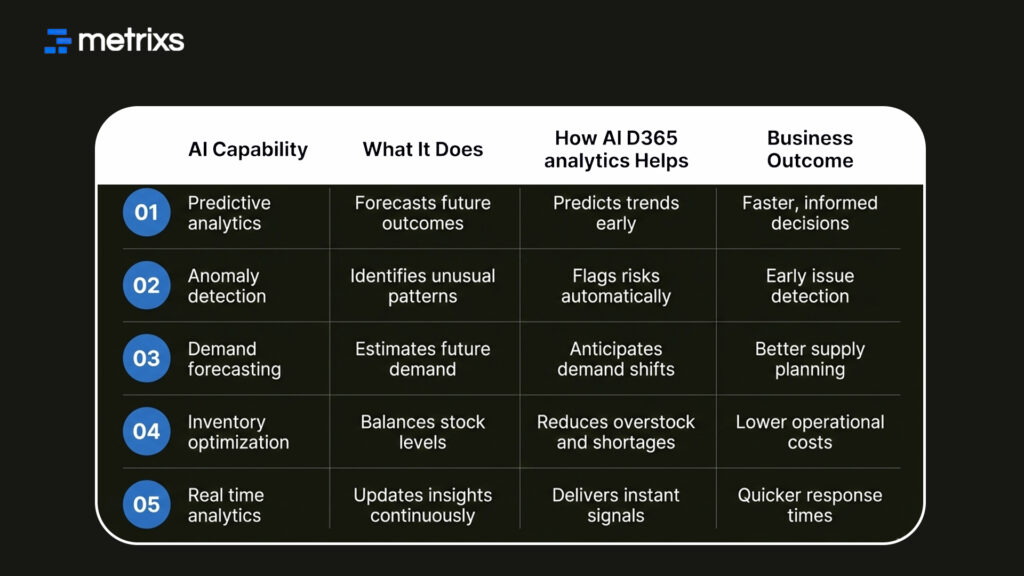
Together, these capabilities explain how AI D365 analytics moves from data processing to decision support. The next shift happens when Copilot makes these insights accessible through natural language instead of technical tools.
How Copilot Changes D365 Analytics
Copilot shifts how teams access AI D365 analytics by removing technical barriers. Instead of relying on reports or analysts, business users interact with insights directly inside Dynamics 365.
1. Natural Language Queries
Users ask questions in plain language and get answers instantly. Copilot translates requests into queries powered by Dynamics 365 predictive analytics and business intelligence D365. This speeds up decision cycles and reduces dependency on dashboards.
2. AI-Powered Insights Without Technical Setup
Copilot surfaces AI-powered insights automatically inside workflows. Signals appear using predictive analytics, machine learning, and real-time analytics, without manual configuration or model training.
3. Decision Support for Business Users
Copilot highlights trends, explains drivers, and recommends actions through automated decision-making. With AI D365 analytics, insights arrive where work happens, setting the stage for practical business use cases across teams.
Real Business Use Cases
AI D365 analytics shows its value when it drives clear results in daily operations. Each function sees impact once predictions replace late reactions.
Use Case #1: Finance
A CFO reviews cash reports every week and still faces surprise gaps. With AI D365 analytics, Dynamics 365 predictive analytics flags cash flow risk early by analyzing payment behavior and trends. One finance team used predictive analytics machine learning to identify delayed receivables nearly two weeks earlier, giving them time to adjust credit terms and plan funding.
Impact: Fewer cash surprises, stronger liquidity control, and faster response to risk.
Use Case #2: Supply Chain
A retail team deals with stockouts during seasonal demand spikes. Using AI D365 analytics, demand forecasting and inventory optimization models predict demand shifts before orders surge. Planners adjusted reorder points in advance and avoided emergency purchases.
Impact: Lower carrying costs, fewer stockouts, and more stable supply planning.
Use Case #3: Sales and Customer Operations
A sales manager reviews pipeline health after deals slip. With AI D365 analytics, predictive scoring highlights high-risk deals and churn signals early. One team refocused outreach based on these signals and protected renewals that were close to dropping.
Impact: Higher win rates, better retention, and clearer sales priorities.
Quick View: Real Business Use Cases with AI D365 Analytics

These outcomes show why scaling AI across D365 requires the right execution model.
How Metrixs Helps With AI D365 Analytics
Metrixs helps enterprises turn AI D365 analytics into something practical inside Microsoft Dynamics 365 Finance and Operations. Instead of scattered ERP data and manual reports, Metrixs consolidates information into a single, reliable view across finance, inventory, and operations. This allows teams to use AI D365 analytics as a decision system, not just a reporting layer.
With a library of over 1,000 metrics and 100-plus prebuilt reports, Metrixs accelerates AI D365 analytics adoption without heavy setup. Teams achieve faster reporting and consistent accuracy, which removes data conflicts and restores trust in numbers. Dynamics 365 predictive analytics becomes easier to apply once clean, unified data is already in place.
Key strengths include:
- Rapid integration: Go live in under six weeks with minimal disruption while activating AI D365 analytics inside existing D365 workflows.
- On-demand data snapshots: Capture historical trends, workforce shifts, and inventory movement to support predictive analytics machine learning.
- Multi-region flexibility: Track currencies and units consistently for global AI D365 analytics reporting.
- Centralized financial oversight: Automate balance sheets and summaries for real-time visibility using business intelligence D365.
The result is simple. Metrixs help leaders act on signals faster and use AI D365 analytics to guide growth decisions with confidence.
Conclusion
The shift toward AI D365 analytics reflects how Dynamics 365 analytics has grown from basic reporting into prediction and action. Still, many teams struggle with delayed data, inconsistent numbers, and reports that explain issues after damage is done.
When forecasts miss demand shifts or cash risks, the cost shows up fast. Wrong predictions lead to overstock, missed revenue, strained cash flow, and leadership decisions built on noise instead of facts. That pressure creates fear-driven reporting rather than clarity.
This is where structure matters. With AI D365 analytics supported by Dynamics 365 predictive analytics, teams move from reactive reporting to dependable signals. Metrixs supports this transition by bringing consistency, context, and accuracy into D365 analytics. The result is not hype. It is calmer decisions, fewer surprises, and data leaders can be trusted.
Book a quick demo with Metrixs to see how AI D365 analytics works inside Dynamics 365 with clarity and confidence.
FAQs
1. What is the difference between predictive and prescriptive analytics in Dynamics 365?
AI D365 analytics uses Dynamics 365 predictive analytics to forecast outcomes like demand, revenue, or churn using predictive analytics machine learning. Prescriptive analytics goes a step further by suggesting actions through AI-powered insights, alerts, and automated decision-making based on those predictions.
2. What data is required to use AI D365 analytics effectively?
AI D365 analytics works best with clean transactional data from finance, sales, and supply chain stored in Dataverse. For accurate Dynamics 365 predictive analytics, historical data, consistent master records, and optional integration with Azure machine learning improve forecasting and predictive scoring results.
3. How accurate are predictions generated by D365 AI models?
Accuracy depends on data quality and model setup. With governed data, AI D365 analytics delivers dependable forecasts, anomaly detection, and trend signals. Teams combining business intelligence D365 with predictive analytics machine learning gain higher confidence in planning and early risk detection.
4. How long does it take to implement AI D365 analytics?
Foundational AI D365 analytics features can deliver value within weeks. Advanced use cases like demand forecasting, inventory optimization, or churn models take longer if customization is required. A phased approach helps teams activate Dynamics 365 predictive analytics without long project timelines.
5. Should organizations roll out AI D365 analytics incrementally or all at once?
Most organizations start incrementally. AI D365 analytics supports phased rollout by function, such as finance first, then supply chain or sales. This approach lets teams validate predictive analytics machine learning outcomes early before expanding across the business.

