


Most companies move to Dynamics 365 expecting efficiency, transparency, and predictable spending. They get cost creep instead. Research from 2025 shows organizations overspend anywhere from $10,000 to $150,000 in their first year because of preventable D365 pricing mistakes.
One manufacturing company overshot its budget by $140,000 from mismanaged data migration, unnecessary customization, and incorrect license assignments. The core issue isn’t that D365 pricing runs too high. Dynamics 365 licensing costs involve far more than subscription fees.
Hidden implementation factors, poor license planning, compliance gaps, and lack of audits push ERP total cost of ownership higher than anticipated. Industry data shows almost 90% of companies don’t actively monitor subscriptions, leaving them exposed to over-licensing, role mismatches, and budget overruns.
Mistake 1: Over-Licensing Users Who Don’t Need Full Access
License assignment decisions made without role analysis create the most expensive recurring cost in Dynamics 365 deployments.
A) Why It Happens
Teams assign expensive enterprise licenses by default. Nobody wants to risk under-licensing, so IT chooses the highest tier “just in case.” Organizations often over-license to avoid potential license compliance audit penalties.
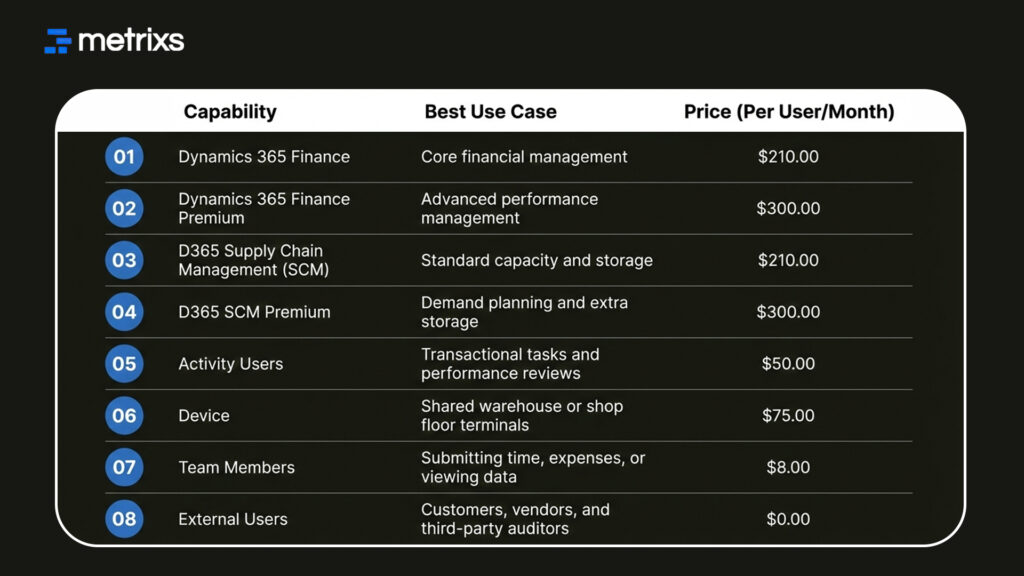
A Dynamics 365 Finance license costs $210 per user monthly. Team Member licenses run only $8 monthly. This results in a 26x price difference for users needing basic access only. Departments also purchase independently without oversight. Regular usage audits do not happen, so licenses accumulate like forgotten subscriptions.
B) Impact on Costs
The price gap between tiers is massive. For example, Finance Premium costs $300 per user monthly versus the standard Finance license at $210. That $90 difference across 50 users for three years equals $162,000 wasted on over-licensing errors. These D365 user seat costs inflate your ERP total cost of ownership quickly.
C) The Fix
Map actual user roles first to improve your software licensing strategy:
- Sales reps needing data views: Use Team Member licenses ($8/month).
- Staff with moderate tasks: Evaluate Operations Activity licenses ($50/month).
- Multi-app users: Apply the base attach license model to save significant budget annually.
Use the Power Platform admin center for a quarterly license compliance audit. Cost optimization through right-sizing cuts costs immediately. Over-licensing errors are not the only problem. Companies also miss major discounts built into Microsoft’s D365 pricing structure.
D365 Pricing Quick Glance
Mistake 2: Ignoring Base-Attach Licensing Discounts
Microsoft built substantial savings into Dynamics 365 licensing costs through Base-Attach pricing. Most companies pay full price for every application instead.
A) What Organizations Get Wrong
Microsoft’s pricing structure offers one base license plus discounted attach licenses. Companies ignore this and purchase full-price licenses for each app a user touches.
Organizations stay unaware of qualification requirements. Multiple departments purchase separate full licenses without coordination. Nobody implements a centralized software licensing strategy.
B) What It Should Cost
Business Central Premium runs $100 monthly as a base license. Customer Service Attach adds $20 monthly versus $95 standalone. Annual savings reach $900 per user.
Supply Chain Management at $180 monthly paired with Finance Attaching instead of separate purchases cuts D365 pricing significantly.
C) The Fix
Identify multi-app users across your organization. Restructure existing licenses using the base attach license model. Finance as base and sales as attached works for most companies.
The highest-priced app must serve as your base license. Work with a Microsoft partner for license compliance audit and optimization. Document assignments in a centralized system. Review new hires for proper configuration from day one.
Proper base attach license model usage delivers immediate savings. But staying compliant requires understanding Microsoft’s upcoming enforcement changes.
Mistake 3: Missing Microsoft’s November 2025 Compliance Requirements
Microsoft changed how it enforces license compliance audit rules for Dynamics 365 Finance and Operations. Understanding D365 pricing compliance prevents expensive budget overruns from emergency license purchases.
A) What the Enforcement Means
The staged rollout begins January 15, 2026, aligned with contract anniversaries. Originally set for November 1, 2025, Microsoft delayed implementation for customer preparation.
Power Platform admin center enhanced reporting launched April 30, 2025. Finance, operations, supply chain, commerce, HR, and project operations all face license enforcement. User security roles must match assigned licenses exactly. This affects Dynamics 365 licensing costs and overall pricing strategy.
B) Financial Risk
Users get locked out without valid licenses. ERP.Today reported organizations discovering thousands of unlicensed users during audits. Companies face immediate license assignment purchases at full retail D365 pricing.
Disruption costs add up fast:
- Month-end close delays
- Shipment holds
- Payroll processing issues
- Lost productivity during access restoration
Delinea case studies show manufacturing companies requiring thousands of additional licenses after security role analysis. Microsoft can back-bill for non-compliant usage. Audit exposure brings contractual penalties and unexpected budget overruns.
C) The Fix
Run license compliance audit checks in the Power Platform admin center now. Navigate to Billing → Licenses → Finance & Operations for dashboard views. Compare assigned licenses against security role requirements.
Fix role mismatches before your enforcement date. Assign licenses through the Microsoft 365 admin center. Review security role design for cost optimization opportunities. Work with implementation partners for license-to-role alignment and proper ERP total cost of ownership planning.
Compliance mistakes cost money. So do hidden implementation costs that surface after contracts get signed.
Mistake 4: Underestimating Hidden Implementation Costs
D365 pricing subscription fees represent only part of your actual investment. Hidden implementation costs typically run 1.5 to 2 times the annual licensing spend.
A) Where Costs Escalate
Implementation costs range from $25,000 to $250,000 for most projects. Understanding ERP total cost of ownership means planning for:
- Data migration costs: Cleaning and validation work ($5,000 to $15,000 basic, $15,000+ complex)
- Customization expenses: $5,000 to $150,000 depending on scope
- Integration complexity with third-party systems
- User training expenses: 10 to 20 percent of implementation budgets
- Testing and validation phases
B) Real Examples
One company migrating 20 GB of legacy data spent $30,000 on post-go-live cleanup. Another manufacturer spent $40,000 on unnecessary custom workflows standard features could have handled. A healthcare organization generated $10,000 in support tickets from inadequate training during the first month.
C) The Fix
Clean data early. Use out-of-the-box capabilities before building custom solutions. Budget 10 to 15 percent contingency for unforeseen expenses. Allocate 15 to 20 percent for training and change management.
Use Microsoft templates to reduce data migration costs. Document requirements thoroughly before any customization expenses begin. A proper pricing strategy includes realistic implementation planning. Training cuts hurt worse through reduced adoption and mounting support demands.
Mistake 5: Cutting Training and Change Management Budget
User training expenses get slashed first when budget overruns threaten project timelines. This mistake increases D365 pricing waste through poor adoption and mounting support costs.
A) Why It Backfires
Undertrained teams generate excessive support tickets. Users resist new workflows without proper preparation. Panorama Consulting data shows 44 percent of ERP projects experience significant budget overruns. Poor adoption undermines ERP total cost of ownership returns.
Workflow errors from insufficient system knowledge create expensive fixes. Change management specialists cost additional funds but prevent implementation derailment and reduce long-term Dynamics 365 licensing costs waste.
B) The Fix
Provide structured training for core users before go-live:
- Hands-on sessions with realistic scenarios
- Role-based training modules for different user groups
- Process walk-throughs specific to department workflows
- User manuals and quick-reference guides
Budget $5,000 to $75,000 for training depending on organization size. Haile Solutions recommends 50 to 70 percent of implementation budgets for planning, migration, customization expenses, training, and change management combined.
Involve stakeholders early in implementation. Make key staff members internal champions. Schedule regular check-ins post-go-live. Calculate internal staff costs at fully loaded salary rates.
Training investments prevent D365 pricing waste through proper adoption and effective license assignment. But even trained users need the right licenses reviewed regularly.
Mistake 6: Skipping Annual Licensing Audits
Organizations that skip regular license compliance audit reviews lose 10 to 20 percent annually to preventable waste. D365 pricing costs climb silently without oversight.
A) Why Costs Rise Over Time
Users leave, but licenses remain active. Roles change, but license assignment updates don’t happen. New modules roll out without optimization reviews.
Auto-renewals happen without usage verification. Gartner predicts 30 percent of SaaS spending goes to toxic costs: unused licenses and features nobody touches.
B) Savings Opportunity
Quarterly audits routinely uncover significant waste:
- Inactive user licenses consuming budget
- Users assigned multiple full licenses incorrectly
- Departments using higher tiers than necessary
- Orphaned accounts: 31 percent of companies have former employees accessing systems
Companies save 15 to 25 percent annually through proper optimization. Large organizations achieve $120,000 or more in annual savings with base-attach license model restructuring. Microsoft 365 E5 to E3 downgrades save 42 percent per user.
C) The Fix
Run quarterly optimization reviews at a minimum. Use Power Platform admin center reporting tools. Check the Billing → Licenses dashboard regularly. Map usage data to assigned licenses.
Review SSO logs for login activity. Identify last login dates for all users. Survey departments for actual usage patterns. Compare paid licenses against utilized licenses.
Establish approval workflows for new subscriptions. Assign clear ownership for each application. Implement SaaS management platforms for automation. Document license assignment policies. Create dashboards for budget owners showing waste metrics.
6 D365 Pricing Mistakes At a Glance:
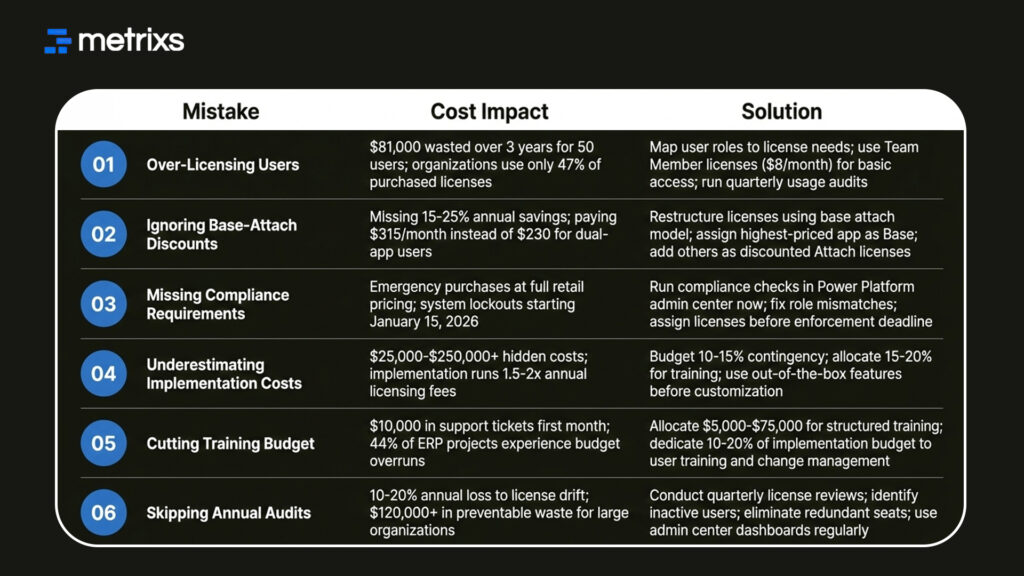
Regular audits control Dynamics 365 licensing costs and prevent budget overruns. Professional help accelerates optimization results and improves ERP total cost of ownership.
How Metrixs Helps You Reduce D365 Costs
Metrixs fixes D365 pricing leaks by applying elite compliance standards and industry best practices. As a premium service provider, we turn complex ERP data into 100+ pre-built reports with 99.9 percent accuracy. This visibility stops customization expenses and prevents budget overruns before they start.
We optimize your ERP total cost of ownership through:
- Elite Audits: We simplify your license compliance audit to ensure total accuracy and zero penalties.
- Usage Insights: Track license assignment patterns to stop paying for unused seats.
- Rapid Deployment: Our 6-week integration improves your pricing strategy without business disruption.
Our expertise stabilizes Dynamics 365 licensing costs and keeps your D365 pricing predictable.
Conclusion
Ignoring D365 pricing mistakes leads to budget leaks you might not see. Between over-licensing errors and messy license assignment, your Dynamics 365 licensing costs grow quickly. Many companies struggle to fix this because their ERP data is siloed. This lack of clarity drives up your ERP total cost of ownership.
Metrixs help you gain control by turning raw data into clear reports. It provides the visibility needed to track performance and spot waste across your organization. When you see exactly how your team uses the system, you can improve your D365 pricing strategy. Use better data to ensure your ERP works for your growth.
Connect with Metrixs today to get an audit and stabilize your D365 pricing today.
FAQs
1. What’s the difference between Base and Attach licenses?
One primary full-price app serves as your base license. Additional apps are added at discounted attach rates, preventing double D365 pricing payments. The base attach license model requires your highest-priced app as the base. This pricing strategy reduces Dynamics 365 licensing costs by 15 to 25 percent annually, saving $1,020 or more per multi-app user through proper license assignment.
2. How can we audit our D365 licensing?
Use the Finance & Operations license overview report in the Power Platform admin center. Navigate to Billing → Licenses → Finance & Operations for dashboards. Compare assigned licenses to actual usage, and identify over-licensing and redundant seats. Check SSO logs and security roles. Run quarterly license compliance audit reviews to control D365 pricing and catch misalignment early before budget overruns occur.
3. What happens if we’re not compliant by November 2025?
Microsoft’s enforcement begins January 15, 2026. Users without valid license assignments will be completely locked out. No access to financials, procurement, inventory, or supply chain. Companies face immediate emergency purchases at full retail D365 pricing. Microsoft may conduct audits, back-bill usage, and enforce contractual penalties. Operations halt, creating expensive disruptions and compliance risks.
4. How much can Base-Attach optimization save?
Typically 15 to 25 percent annually on Dynamics 365 licensing costs. Some organizations save $120,000 yearly with proper base attach license model restructuring. A dual-app user drops from $315 to $230 monthly, saving $1,020 annually. Multiply across 100 users for six-figure reductions. This pricing strategy delivers immediate cost optimization and improves ERP total cost of ownership.
5. Should we budget beyond licensing for implementation?
Yes. Real D365 pricing includes data migration costs, customization expenses, integrations, and user training expenses. Implementation typically costs 1.5 to 2 times annual subscriptions. Finance & Operations projects reach $250,000 to $1,000,000. Budget a 10 to 15 percent contingency. Understanding ERP total cost of ownership prevents budget overruns and controls hidden implementation costs like consulting fees and change management.
6. How often should licensing be reviewed?
Quarterly reviews prevent over-licensing waste and control Dynamics 365 licensing costs. Role changes and turnover create licensing drift quickly. Industry data shows 10 to 20 percent annual loss without regular license compliance audit processes. Quarterly governance reduces unused costs by 25 percent versus annual reviews. Check Power Platform admin center dashboards every 90 days for cost optimization.

