


Waiting for a monthly report while your churn rate spikes leads to disaster. You need answers now. This is why ad hoc reporting is a staple for modern teams. By using self-service analytics, you can pull real-time insights and create custom reports without waiting on IT.
These reporting tools help you make data-driven decisions that work. However, giving everyone access requires strong data governance to keep numbers accurate. This guide shows you how to master ad hoc reporting today.
Understanding Ad Hoc Reporting and Self-Service Analytics
You cannot always predict the questions you need to answer. While standard reports track recurring metrics, ad hoc reporting allows you to build custom reports for unique situations. It helps you solve specific business problems as they appear.
1. The Shift to On-Demand Reporting
Scheduled reports follow a rigid calendar. Ad hoc reporting provides answers for one-off queries. This on-demand reporting approach saves time because you skip the IT queue. You select your own data and run the numbers yourself.
Most leaders now choose self-service analytics to keep their teams moving fast. Using ad hoc reporting ensures you do not miss sudden market shifts.
2. Solving Problems with Business Intelligence Reporting
Teams use business intelligence reporting to stay ahead of competitors.
- Sales: You can analyze lead quality for a specific city during a lunch meeting.
- Marketing: You can track how a new social post affects sales in real time.
- Finance: You can find the root cause of an over-budget category immediately.
Modern reporting tools make data-driven decisions simple for non-tech users. You use data visualization to turn raw numbers into clear, actionable charts. Regular use of ad hoc reporting gives your company a competitive edge.
A flexible system works best when you follow proven implementation steps.
Essential Best Practices for Ad Hoc Reporting Implementation
Launching a system for ad hoc reporting requires a balance of clear rules and accessible technology. You want your team to find answers quickly without compromising data integrity. These practices build a reliable foundation for self-service analytics that your entire organization can trust.
1. Establish Clear Data Governance Frameworks
Success starts with data governance. You must set formal rules for how your company tracks and manages its information. A structured data catalog is the best way to organize your custom reports and verified datasets. This catalog acts as a map, helping users find the right figures for on-demand reporting.
You should also:
- Categorize data by sensitivity levels.
- Document exact definitions for every metric.
- Use automated monitoring to identify quality issues early.
When everyone knows exactly what a metric like “monthly revenue” means, you prevent confusion during business intelligence reporting.
2. Implement Role-Based Access Controls and Permissions
Not every employee needs to see every data point. You should use role-based permissions to protect sensitive information while allowing for ad hoc reporting. This setup keeps your company compliant and secure.
Modern platforms allow you to set specific boundaries. For example, a sales lead might see every transaction in their region, while an intern only sees high-level totals. By using these role-based permissions, you give users the specific tools they need for their specific jobs. Regularly auditing these access levels ensures your business intelligence reporting stays safe as your team grows.
3. Provide User-Friendly Tools With Governed Data Sources
Your reporting tools must be simple enough for anyone to use. Most people work best with a drag-and-drop interface to create a data visualization. However, these tools should only connect to verified, cleaned data sources.
To help your team get started:
- Offer pre-built templates for common custom reports.
- Use report automation to handle repetitive tasks.
- Provide a curated library of approved datasets.
This “governed” approach makes self-service analytics accessible while keeping the results accurate.
4. Start With Clear Business Questions
Before you begin any ad hoc reporting task, you need a specific question. Vague goals lead to “data fishing” and wasted hours. Train your team to ask focused questions like, “Why did our shipping costs rise by 10% last month?“
Focused questions lead to better on-demand reporting. When you know exactly what you are looking for, you get real-time insights that lead to actual business changes. This keeps your business intelligence reporting efficient and actionable.
5. Maintain Data Quality Standards and Validation Processes
The value of ad hoc reporting depends entirely on the quality of your data. You must enforce high standards for accuracy and freshness. Use automated validation rules to flag errors, like missing customer IDs or impossible dates, before they appear in your reports.
Assigning data stewards to specific departments helps maintain these standards over time. These experts ensure the data stays clean and relevant. When your team trusts the numbers in their reporting tools, they make better data-driven decisions.
6. Create Feedback Loops and Continuous Improvement Processes
Always ask your team how the ad hoc reporting system is working for them. If a user finds a bug or needs a new metric, they should have a simple way to report it. This feedback is what makes your self-service analytics improve.
Track which reports are the most popular. If you see a specific ad hoc report being run every Monday, use report automation to add it to your scheduled reports. This transition shows that your company is maturing in how it handles data.
A Table of Strategies for Successful Ad Hoc Reporting:
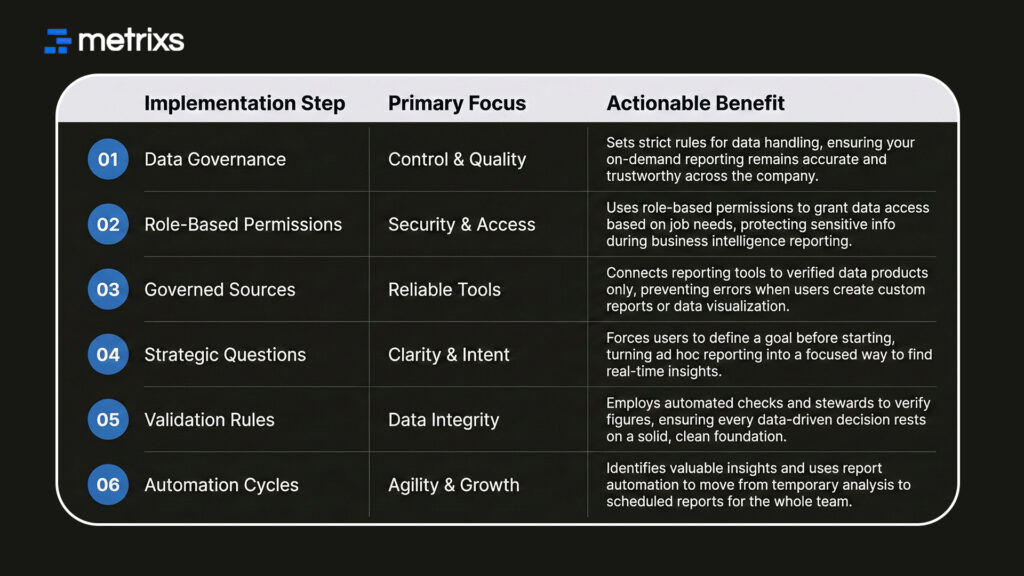
By following these steps, you ensure your team always has the best information to win.
Simplify Your Ad Hoc Reporting Balance with Metrixs Analytics
Metrixs offers advanced reporting tools designed for Microsoft Dynamics 365 Finance & Operations. Our platform turns raw ERP data into real-time insights across finance and inventory.
We help you achieve 99.9% data accuracy while making ad hoc reporting 80% faster.
Why choose Metrixs for your reporting:
- Rapid Integration: Launch your self-service analytics strategy in under six weeks.
- On-Demand Snapshots: Instantly capture historical trends for better data-driven decisions.
- Global Flexibility: Track multiple currencies and regions with consistent business intelligence reporting.
- Financial Automation: Use report automation to reduce manual work on balance sheets.
Metrixs eliminates data silos and manual errors. We provide the clarity you need to scale your ad hoc reporting efficiently. Explore Metrixs to see how our reporting tools simplify ad hoc reporting and help you win with real-time insights → Metrixs
Conclusion
Building a strong foundation for ad hoc reporting requires a blend of data governance and user empowerment. When you follow these best practices, your team accesses real-time insights to solve problems fast.
Without a clear plan, self-service analytics can create confusing datasets and mismatched figures. Using unverified reports often results in poor choices that cost your business time and revenue.
These avoidable errors happen when tools lack proper oversight. Metrixs solves this by providing a secure way to handle business intelligence reporting. Our platform ensures your ad hoc reporting stays accurate and useful. You get the flexibility your team wants with the control your business needs to stay ahead.
Connect to Metrixs and discover how our reporting tools provide the perfect balance between ad hoc reporting flexibility and total data control.
FAQs
1. What is the difference between ad hoc reporting and scheduled reporting?
Scheduled reports track KPIs on a set timeline, while ad hoc reporting answers sudden questions. You use ad hoc reporting for on-demand reporting to find real-time insights. Most reporting tools handle both to improve your business intelligence reporting and strategy.
2. How do you balance user flexibility with data governance in ad hoc reporting?
You balance these by using role-based permissions within a data governance framework. This lets users build custom reports using self-service analytics while keeping data secure. This structure ensures data-driven decisions are based on verified, high-quality sources every time.
3. What are the biggest challenges in implementing ad hoc reporting capabilities?
Poor data quality and complex reporting tools often hinder adoption. Without data governance, ad hoc reporting creates inconsistent results. Many teams struggle to integrate self-service analytics without clear rules, leading to confusion instead of helpful, real-time insights for growth.
4. How quickly can organizations see ROI from ad hoc reporting implementations?
Most teams see gains within months. By using report automation, you save time and reduce IT costs. Ad hoc reporting delivers fast real-time insights, allowing you to fix issues before they grow. This efficiency makes business intelligence reporting highly profitable.
5. What security measures should be implemented for ad hoc reporting?
You must use role-based permissions and data governance to protect your information. Secure reporting tools restrict sensitive data while allowing for on-demand reporting. Regular audits ensure your ad hoc reporting remains compliant while providing the team with necessary real-time insights.
6. How do you measure the success of ad hoc reporting initiatives?
Track how often your team uses self-service analytics to make data-driven decisions. Success means faster answers and better data visualization. When ad hoc reporting reduces the IT workload and provides real-time insights consistently, your data strategy is working well.

