

Manual account reconciliation errors cost one company $3 million from a single spreadsheet mistake. This risk explains why the reconciliation software market will hit $8.10 billion by 2034.
Even so, only 22% of firms use an automated reconciliation workflow. Most finance teams still spend days on their month-end close. Switching to modern tools saves 3.5 days on average.
Ledge provides visibility into issues before they cause problems, a G2 user reports. Modern teams use these structures to fix their financial close process and simplify account reconciliation in 2026.
Why the Old Account Reconciliation Workflow Is a Liability in 2026
Relying on legacy tools for your account reconciliation creates a massive blind spot. Most finance teams know manual work is slow, but few track the actual dollar cost per close cycle.
1. The Spreadsheet Problem That Won’t Go Away
Manual error rates in account reconciliation average 10–15%. These mistakes create compounding risks across your financial statements. When your staff manually inputs figures into a general ledger under pressure, errors often stay hidden until an audit.
Common issues with this approach include:
- Data fragmentation: Tools like NetSuite handle basic tasks but fail at transaction matching when data comes from multiple banks or payment processors.
- Manual exports: Teams export data to spreadsheets, reconcile it, and re-import the results. This loop introduces new errors at every stage.
- Risk of loss: A single broken formula can lead to millions in lost revenue or compliance fines.
2. What a Delayed Financial Close Actually Costs
Finance teams lose up to three working days per account every month on manual account reconciliation. This delay prevents leadership from seeing the true state of the business.
- Bottlenecks: Manual validation routes through email add days to your financial close process.
- Data lag: Companies with an automated reconciliation workflow access financial info 87% faster than those using separate platforms.
- Bad decisions: Making moves based on unreconciled data is a gamble, not a strategy.
The real cost of a slow close is the inability to pivot when the market shifts. Using an automated reconciliation workflow removes these barriers.
Moving from these liabilities requires a shift toward a modern, production-ready structure.
The Core Structure of a Modern Automated Reconciliation Workflow
A production-ready automated reconciliation workflow in 2026 prioritizes direct data connectivity over manual exports. Modern account reconciliation starts with seamless data ingestion.
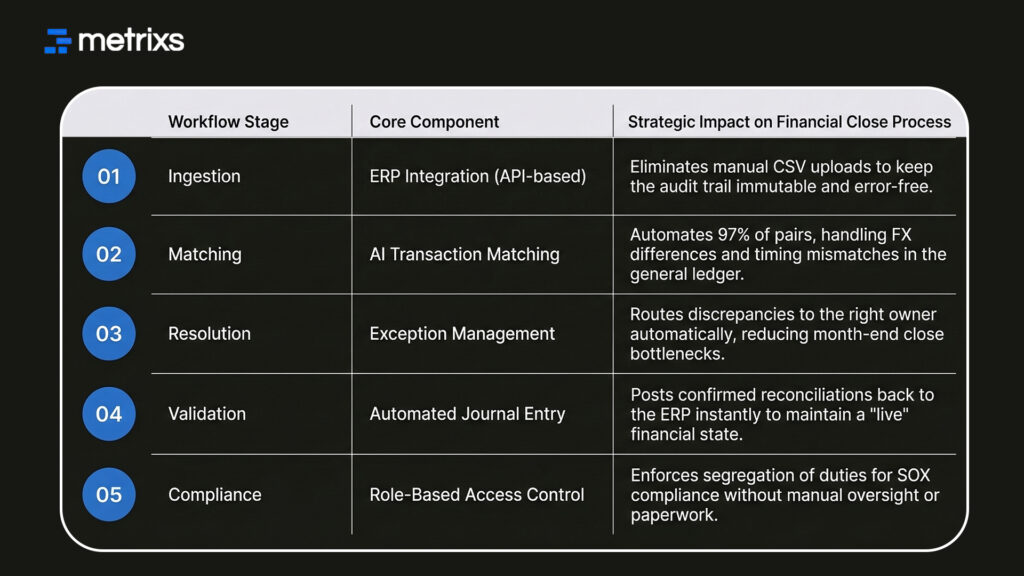
High-performing teams now pull data directly from ERPs, banks, and payment processors through API connections. This protects your audit trail from the common errors found in manual CSV uploads.
1. Data Ingestion and Transaction Matching
AI-driven transaction matching automatically pairs entries across sources using configurable rules. This account reconciliation tech handles timing mismatches and FX differences with ease.
- Accuracy: AI-driven entity matching improves detection accuracy to 97% compared to 81% in older systems.
- Speed: Real-time synchronization reduces data latency from 24 hours to under 5 minutes.
- Consistency: Automated account reconciliation removes the bias of manual judgment during high-volume periods.
2. Exception Routing and Approval Automation
An automated reconciliation workflow removes the need to review every line item. Instead, your team focuses only on flagged discrepancies.
- Auto-Routing: Exceptions go to specific team members based on account type or value.
- Faster Validation: Automated approvals reduce transaction review time by 80%.
- Error Reduction: Finance teams report 65% fewer validation errors after automating these steps.
- Compliance: Role-based access enforces segregation of duties for your financial close process.
3. Audit Trail and Close Confirmation
Every account reconciliation action is logged in an immutable audit trail. This removes the manual documentation burden that typically consumes hours before each external audit. Standardized reporting templates now support your financial close process without additional formatting work.
Continuous account reconciliation ensures that every journal entry is verified long before the month ends. The following table breaks down the technical components that define a high-performance automated reconciliation workflow in 2026.
Knowing how these systems work is only half the battle. You also need to know which features actual finance teams prioritize in 2026.
The Account Reconciliation Features Finance Teams Prioritize Most in 2026
Not all software solves the same account reconciliation problem. Actual finance teams in 2026 draw a line between simple tools and systems that actually automate the financial close process.
1. ERP Integration Depth vs. Surface-Level Connectivity
Surface-level connectivity forces manual data exports, which creates a high risk for your account reconciliation. Deep ERP integration ensures your systems communicate without human intervention.
- Real-time Posting: High-quality tools post every journal entry back to the general ledger instantly.
- Audit Readiness: Continuous data flow keeps your audit trail clean and updated throughout the month.
- Bi-directional Sync: Your account reconciliation tool should both read from and write to your ERP system.
2. Low-Code Workflow Configuration for Finance-Owned Control
Dependency on IT creates a bottleneck every time you need to update matching rules for your account reconciliation. Finance-owned, no-code rule builders let teams adjust logic without raising technical tickets.
This control matters most during high transaction volumes or when you add new account types mid-year. Giving finance teams direct control over their account reconciliation logic reduces delays and improves overall data accuracy.
How Metrixs Replaces Manual Reconciliation Steps With Automated Financial Workflows
Metrixs turns your Microsoft Dynamics 365 data into a high-speed account reconciliation engine. It consolidates raw ERP numbers to show a unified view of your financial performance.
By replacing manual steps with an automated reconciliation workflow, Metrixs delivers 99.9% data accuracy and 80% faster reporting.
- Rapid Integration: Go live with your account reconciliation in under six weeks.
- Multi-Region Support: Track various currencies to keep your global financial close process consistent.
- Financial Oversight: Automate your balance sheet reconciliation to maintain real-time visibility.
- Cost Efficiency: Use smart insights to cut operational costs by 15%.
Metrixs simplifies account reconciliation so you can scale your business efficiently.
See how Metrixs automates your account reconciliation and speeds up your financial close process with a modern automated reconciliation workflow.
Conclusion
High-performing teams now use a continuous automated reconciliation workflow. Many others struggle with manual account reconciliation and buggy spreadsheets. These hidden errors cause failed audits or multi-million dollar misstatements.
You can’t fix what you don’t track. These mistakes threaten your audit trail and drain your resources. Your month-end close shouldn’t be a gamble. Relying on manual steps for account reconciliation invites financial disaster.
Metrixs automates these tasks to speed up your operations. You get 99.9% accuracy and clean records. Stop the manual grind and secure your books today.
Connect to a more reliable financial close process.
FAQs
1. What is account reconciliation, and why does it matter?
Account reconciliation compares your internal records against bank statements to ensure accuracy. It matters because unreconciled accounts delay your financial close process and create audit risks. Using reconciliation software ensures every journal entry is correct, protecting your general ledger from expensive manual errors.
2. What does an automated reconciliation workflow include?
An automated reconciliation workflow pulls data from ERPs using ERP integration to perform transaction matching. It handles exception management by flagging errors for review. This system secures your audit trail and ensures your month-end close stays on schedule without any manual data entry.
3. How long does it take to implement account reconciliation software?
Most reconciliation software implementations take four to six weeks. The timeline depends on your ERP integration depth and bank complexity. A modern automated reconciliation workflow syncs quickly to your general ledger, allowing you to improve your financial close process without major business disruptions.
4. What is the difference between bank reconciliation and balance sheet reconciliation?
Bank reconciliation matches cash records to bank statements specifically. Balance sheet reconciliation verifies every account balance across your entire general ledger. Both are vital for a clean audit trail. Automating these tasks within your financial close process reduces errors and speeds up your month-end close.
5. How does continuous reconciliation differ from period-end reconciliation?
Period-end tasks create a massive workload at the end of the month. Continuous account reconciliation matches data daily through an automated reconciliation workflow. This keeps your general ledger updated in real time, making your month-end close faster and reducing pressure on your finance team.
6. What causes most account reconciliation errors in ERP systems?
Most errors come from manual data entry and broken spreadsheets. A lack of ERP integration forces teams to export data, which ruins the audit trail. Implementing an automated reconciliation workflow fixes these issues by automating transaction matching and every journal entry within your system.

