Dynamics 365 Finance and Operations on Microsoft Fabric: from Link to Fabric to reports

Link to Microsoft Fabric (also called Fabric Link) makes your D365 F&O tables available in OneLake as Delta tables, but tables are not reports. Metrixs adds the data model and 150+ ready-made Power BI reports, built on Microsoft Fabric and running in your own Fabric environment.

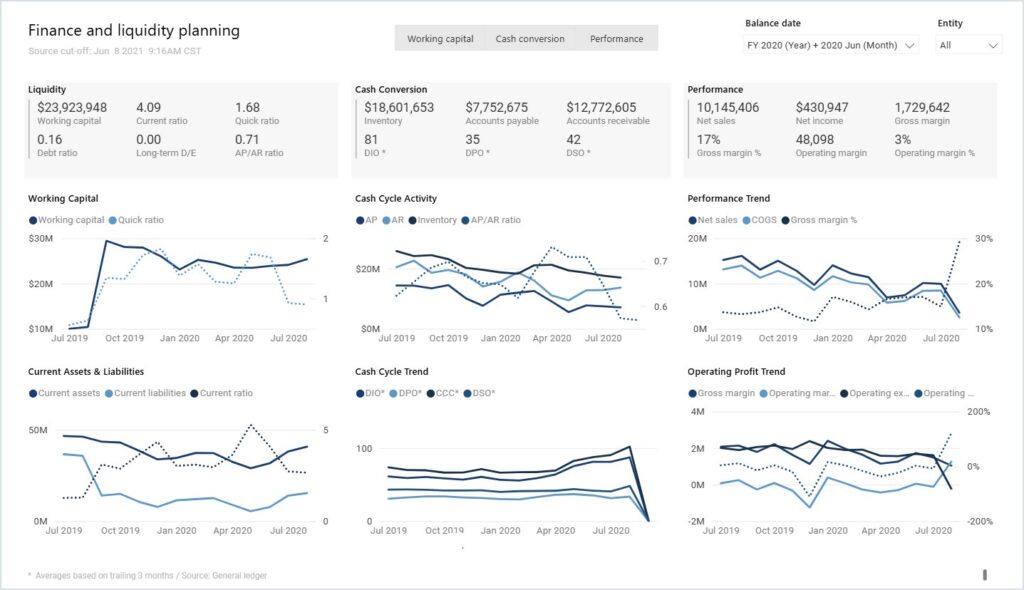
Metrixs finance and liquidity planning report in Power BI for Dynamics 365 Finance and Operations, shown with demo data

After the link

What Link to Fabric leaves you to build

Link to Microsoft Fabric gives you raw F&O tables in OneLake. Turning them into reports finance can use still takes four pieces of work, and Metrixs provides them. See D365 F&O analytics for what the reports cover.

A data model

Fact and dimension tables built from the raw F&O tables.

Metrics and KPIs

1,200+ metrics and 250+ KPIs, defined for finance, supply chain, and projects.

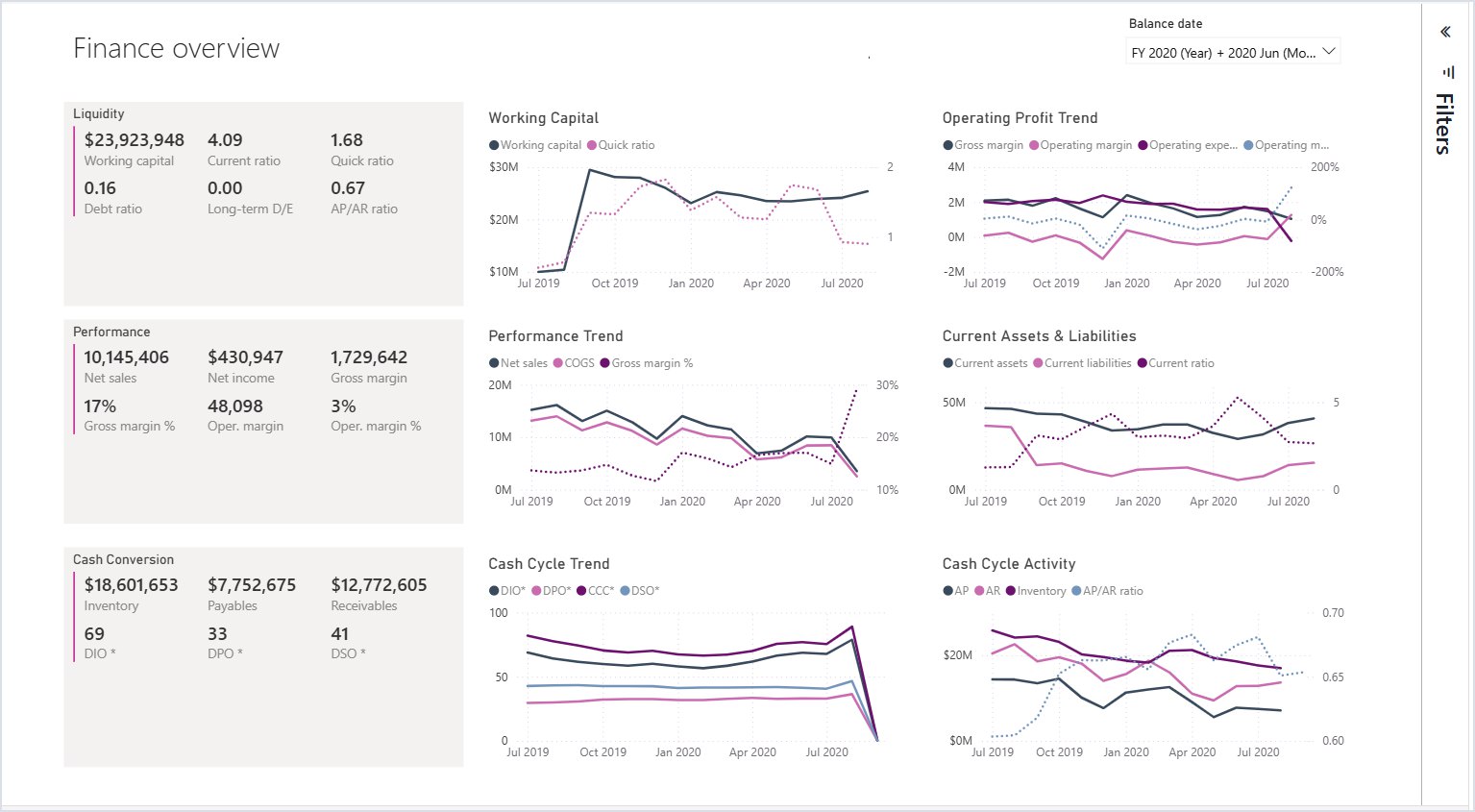
Metrixs finance overview report in Power BI for Dynamics 365 Finance and Operations, shown with demo data

Reports

150+ ready-made Power BI reports, in place of a blank workspace.

Legal entities and currencies icon

Security by legal entity

Report access set up to follow your legal entities.

From F&O to report

How it fits together, and how fresh the data is

Two steps set the freshness of a report: Microsoft’s sync into OneLake (see Microsoft on low-latency sync), then the Metrixs refresh.

Built on Microsoft Fabric
Link to Microsoft Fabric makes F&O tables available in OneLake; Metrixs and Power BI work from there.
15 to 30 minutes
Standard plan, with Direct Lake reports; the time depends on data volume, the number of reports, and Fabric capacity. Basic refreshes nightly.
Under 15 minutes to OneLake
In most observed cases with low-latency sync (Fast Fabric). Microsoft Learn still allows up to 60 minutes.
Your F&O version matters
Low-latency sync needs F&O 10.0.47, 10.0.48, or 10.0.49 at Microsoft's minimum builds. Existing links switch only by relinking, which runs a full initial sync.

What it costs to run on Fabric

Metrixs license

Per user per month, paired with your D365 F&O licenses.

Dataverse storage

The Link to Fabric replica counts toward your Dataverse database capacity. Microsoft's example: syncing 500 GB could add about 100 GB.

Fabric capacity

An F SKU, billed per second or reserved for about 41% less. The size depends on data volume and report use.

Power BI viewers

On F64 or larger, free-license users can view reports. Below F64, each viewer needs Power BI Pro.
Fabric prices vary by region: in Central US, F2 lists at $262.80 a month and F64 at $8,409.60, pay-as-you-go (October 2026); see Microsoft Fabric pricing. Metrixs plans and prices are on the pricing page.

Before you link

Microsoft's prerequisites for Link to Fabric

Link to Microsoft Fabric is set up from Power Apps by someone with the System Administrator role in the Power Platform environment linked to D365 F&O. Microsoft lists the full steps on Microsoft Learn.

In Power Platform

System Administrator role, an environment linked to D365 F&O, and F&O tables selected in the link wizard or under Manage tables, since they are not selected by default.

In Microsoft Fabric

A Fabric capacity in the same region as the Dataverse environment, workspace admin rights, and three Fabric tenant settings switched on. Workspaces limited to private endpoints are not supported.

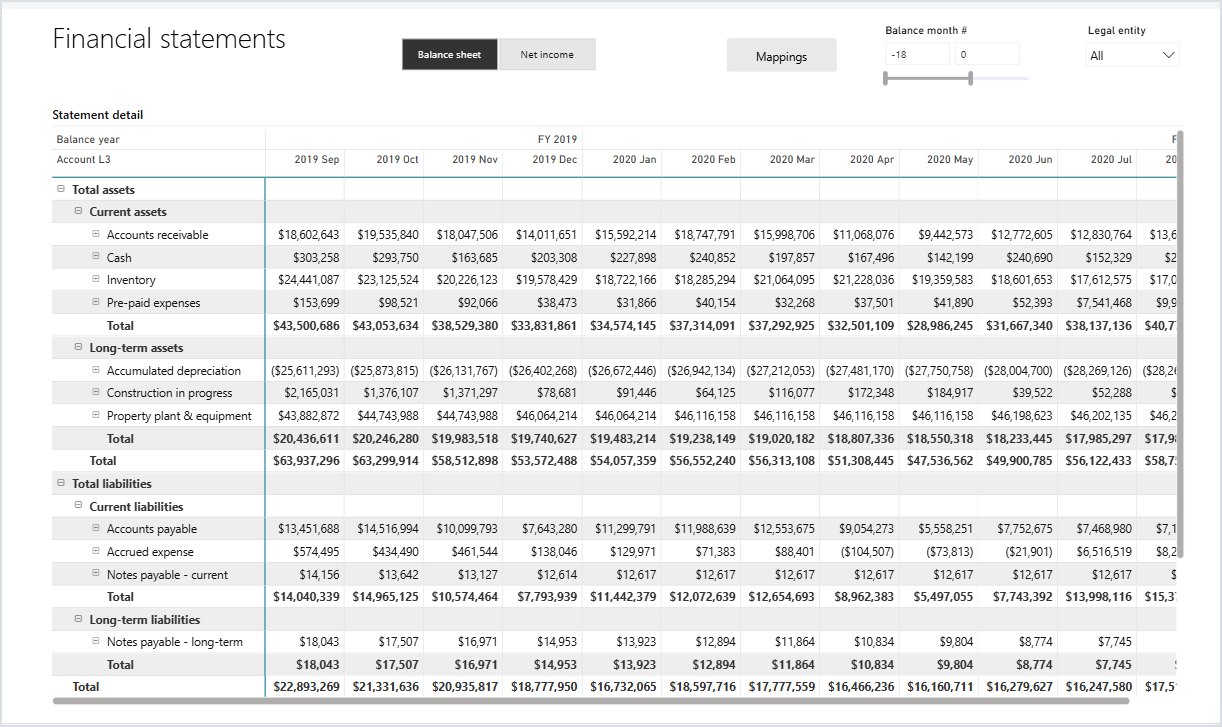
Metrixs financial statements report in Power BI for Dynamics 365 Finance and Operations, shown with demo data

Export to Data Lake

Replacing Export to Data Lake before November 30, 2026

On November 30, 2026, Export to Data Lake stops exporting new or changed data, and Microsoft grants no extensions. Microsoft recommends Link to Microsoft Fabric with low-latency sync, and Azure Synapse Link for teams that must keep exporting data to their own storage account. Synapse Link’s Delta Lake option is closed to new customers from October 15, 2026, and existing users must move by December 2027. Metrixs reads D365 F&O data through Link to Microsoft Fabric or Azure Synapse Link. Sources: removed and deprecated features, transition guide, and Synapse Link Delta Lake on Microsoft Learn.

Frequently asked questions

Microsoft no longer sells Power BI Premium per-capacity (P SKUs). Each P SKU retires at the end of its agreement term, followed by a 30-day free grace period, throttled access on days 31 to 90, and rejected operations from day 91 until workspaces move to Fabric capacity. A P1 matches an F64 in compute. See Microsoft's migration guide.

Not on their own. Link to Fabric refreshes the F&O security tables once a day, but Power BI needs its own security. Metrixs sets this up during rollout.

It depends on your company's size, data volume, and number of users. Direct Lake on F2 to F32 handles tables of up to 300 million rows, and F64 up to 1.5 billion. A 60-day Fabric trial runs at F64 size, so you can measure before you buy; see Microsoft's Direct Lake overview.

No. Link to Fabric works on Dataverse, and Business Central data does not sit in Dataverse. Microsoft has announced Business Central mirroring to Fabric as coming soon. See Business Central analytics for Metrixs on Business Central.

No. The Link to Fabric replica stays in your Dataverse region, and the Metrixs model and reports run in your own Microsoft Fabric environment.

News & Blog

Further reading on Microsoft Fabric and D365 F&O

See Metrixs running on Microsoft Fabric

Get a walkthrough on your own D365 F&O questions, and see if you qualify for a free 6-month trial.

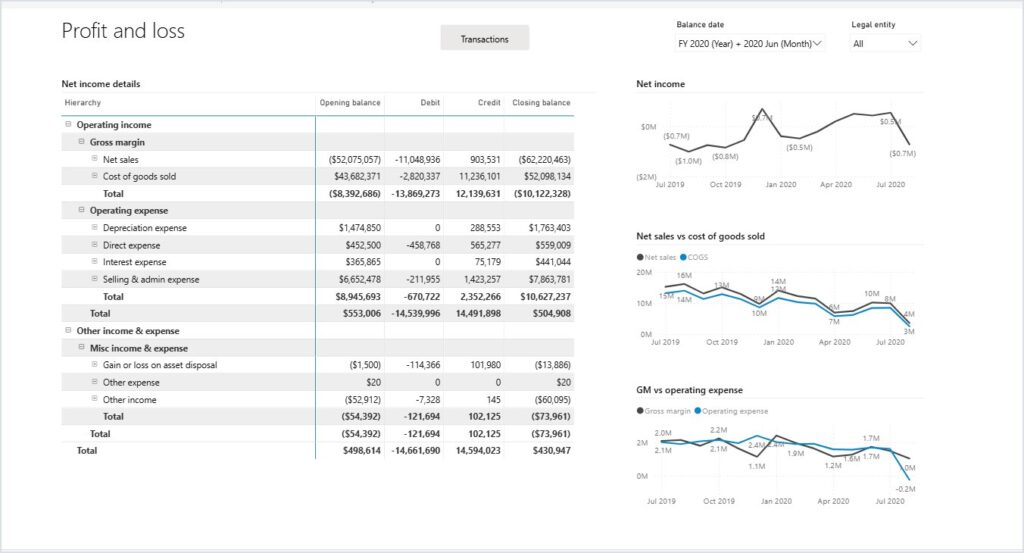
Metrixs profit and loss report in Power BI for Dynamics 365 Finance and Operations, shown with demo data