

Microsoft adoption of microsoft fabric is picking up speed as companies change how they handle info. The enterprise data platform market is growing fast, hitting over 17 billion dollars by 2032. You face a big choice: keep using your current business intelligence tools or switch to microsoft fabric vs power bi.
Studies show companies using Microsoft fabric get a 379 percent ROI over three years. While power bi is great for charts, microsoft fabric handles everything from engineering to math. You should use them together for the best results.
Architecture and infrastructure Power BI vs Microsoft Fabric
Understanding how these systems are built helps you choose the right fit for your team. Here is the breakdown of the technical setup for microsoft fabric vs power bi.
Power BI: Visual-centric design
Power BI is a mature tool for business intelligence. It connects to over 70 sources and uses Power Query for cleanup. However, it usually depends on outside systems for heavy lifting. It has memory limits for datasets that can slow down large reports.
It works best as a reporting layer that pulls from a separate enterprise data platform like a SQL database.
Microsoft Fabric: Unified lakehouse design
Microsoft Fabric changes the game with a lakehouse architecture. It combines seven tools like Synapse Analytics and Data Factory into one place. The core of this system is OneLake, which acts like a “OneDrive for data.”
- OneLake stops you from making extra copies of data.
- It uses a data mesh style to let different teams manage their own info.
- You get a single spot for data governance across your whole company.
By using microsoft fabric vs power bi together, you get the best of both. Fabric handles the data engineering while Power BI shows the results. This setup uses “Direct Lake” mode to query data without long refresh times.
It turns your messy data into a clean enterprise data platform that scales with you. Choosing microsoft fabric vs power bi means moving from simple charts to a full data system.
This technical foundation makes it easier to look at what these tools can actually do for your daily tasks.
Comparing capabilities: Data processing and visualization
Choosing between microsoft fabric vs power bi involves looking at how you handle daily tasks. Power BI focuses on charts, while Microsoft Fabric builds a complete enterprise data platform.
Data engineering and real-time intelligence
Power BI handles business intelligence through Power Query and scheduled refreshes. But it can struggle with huge datasets. Microsoft Fabric uses Apache Spark for high-speed data engineering and distributed computing. It offers real-time analytics via KQL for live data. Power BI shows a point-in-time snapshot. Fabric gives you live insights into streaming data through its lakehouse architecture.
Data science and machine learning
In Power BI, machine learning is limited to simple scripts. Microsoft Fabric provides a Synapse Analytics workspace for serious data science. This environment supports the whole ML life cycle. It helps with training and tracking models. Large teams looking for AI results need the integrated power of Fabric. Power BI then acts as the tool to show those model results to users.
Visualization and reporting excellence
When it comes to the final report, Power BI is still the top choice. It offers over 150 visuals and uses semantic models to keep things organized. This excellence is built into the Fabric workspace. You gain a better backend without losing features when you use both.
You get OneLake storage and a data mesh setup that removes old data size limits. Fabric ensures your business intelligence stays fast and reliable even as your data grows. Using Microsoft fabric vs power bi together creates a strong enterprise data platform for any scale.
Feature comparison: Microsoft Fabric vs Power BI:
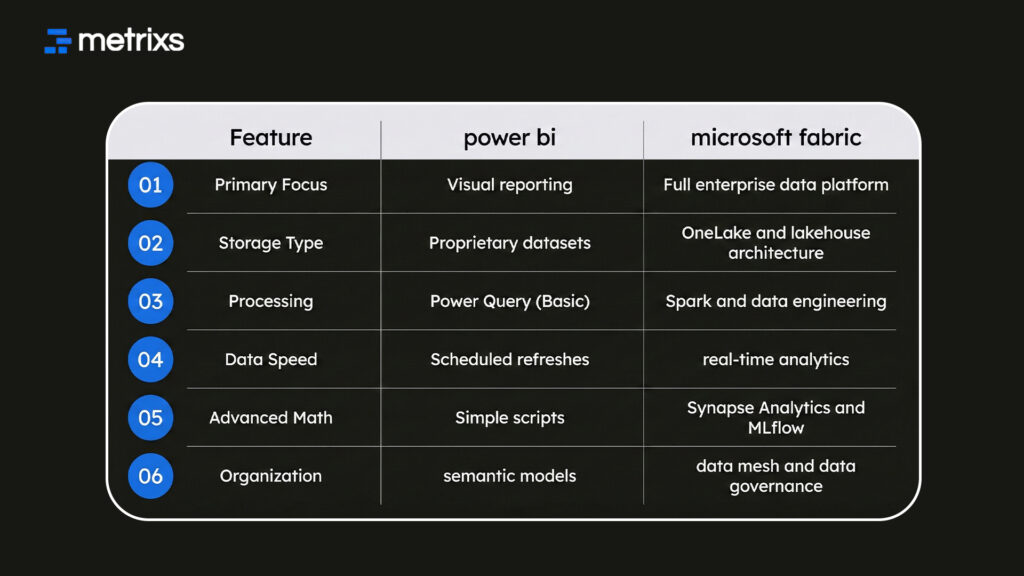
This comparison shows why most companies now use both tools together. You get the best visuals and the strongest backend in one spot.
This setup makes your data more useful across the entire company.
Total cost of ownership and ROI analysis
Buying into a new enterprise data platform requires a clear look at your budget and long-term gains. Here is how the costs stack up for microsoft fabric vs power bi.
Licensing and capacity costs
Power BI usually runs on a per-user model. This is great for small teams with simple business intelligence needs. Microsoft Fabric uses capacity-based pricing. It starts at about 4,800 dollars a month for the F64 level. While Fabric costs more upfront, it covers many jobs. It handles data engineering, storage, and reporting under one fee. For a large company, this often costs less than paying for five different tools.
Measuring return on investment
The ROI for microsoft fabric comes from doing more with less. Studies show companies cut labor costs by 37 percent when they stop jumping between different apps. You also save about 22 percent on storage by using OneLake.
- Small teams might stick with Power BI to save money.
- Large companies see microsoft fabric pay for itself in two to three years.
- It stops “tool sprawl” and makes your data governance easier to manage.
Using microsoft fabric vs power bi means you spend less time fixing connections and more time finding insights. This financial move helps you build a scalable enterprise data platform that doesn’t break the bank as you grow.
The next step is deciding which path fits your specific business goals.
Strategic framework: Choosing the right platform
Selecting between microsoft fabric vs power bi depends on your current goals and team size. Use these guidelines to pick the best path for your enterprise data platform.
When to stick with Power BI
Power BI works perfectly for mid-market companies with simple data. If your team has under 50 users and your data stays in clean spreadsheets or basic databases, you likely don’t need more. It provides fast business intelligence without a complex setup. You can keep your costs low while still getting great reports and dashboards.
When to move to Microsoft Fabric
Microsoft Fabric is the right choice for large enterprises handling massive amounts of info. If you need a lakehouse architecture to manage petabytes of data, Fabric is for you. It centralizes your data governance and supports advanced data engineering in one spot. It also fits teams that need to build and run their own machine learning models using Synapse Analytics.
The hybrid approach
Most companies choose a middle path. They use Power BI for daily reporting while adding Fabric pieces for specific tasks. For example, you might use OneLake to store data from different branches but keep using Power BI for the final charts. This data mesh strategy lets you grow your enterprise data platform at your own pace. Using microsoft fabric vs power bi in this way gives you the most flexibility.
Turn your ERP into a strategic growth engine with Metrixs
Metrixs gives you top-tier analytics for Microsoft Dynamics 365 Finance and Operations. It helps you turn raw numbers into a clear view of your company performance. You can better decide between microsoft fabric vs power bi for your reporting needs.
- Rapid Integration: Get running in under six weeks with a setup that supports your microsoft fabric vs power bi strategy.
- Smart Reporting: Use 1200+ metrics to get 80% faster business intelligence insights and 99.9% accuracy.
- Global Reach: Track multiple currencies and regions to keep your enterprise data platform consistent across all locations.
Metrixs turn your ERP into a growth tool by simplifying how you find value in your data.
Explore how Metrixs simplifies your enterprise data platform and strengthens your business intelligence today.
Conclusion
Choosing between microsoft fabric vs power bi determines how your business handles its most valuable asset. Many companies struggle with fragmented data silos and slow reporting that lead to missed opportunities. Without a unified enterprise data platform, you risk falling behind competitors who use real-time insights to pivot faster.
This gap often creates a chaotic environment where manual errors and outdated numbers drive risky decisions. Metrixs solves this by unifying your business intelligence within the Microsoft ecosystem. It ensures your data stays accurate and accessible, turning potential technical debt into a streamlined engine for growth.
Connect to Metrixs today to maximize your enterprise data platform and ensure your business intelligence stays ahead of the curve.
FAQs
1. Do organizations need both Microsoft Fabric and Power BI or should they choose one?
You get the best results by using both tools together. Microsoft fabric provides a strong foundation for data engineering and data warehousing. Power bi stays the top choice for visualizing that data. This combination creates a powerful enterprise data platform.
2. What are the main architectural differences between Fabric and Power BI?
Power bi connects to data but has storage limits. Microsoft fabric uses OneLake to store petabytes of info in a lakehouse architecture. This setup supports a data mesh where teams manage their own work within a unified enterprise data platform.
3. How do the costs compare between Fabric and Power BI?
Power bi uses per-user licensing for standard business intelligence. Microsoft fabric moves to capacity-based pricing for all your workloads. This includes Synapse Analytics and real-time tools. For large teams, this consolidation simplifies your enterprise data platform costs and saves money.
4. What is the typical implementation timeline for these platforms?
You can set up basic dashboards in two weeks. A full microsoft fabric rollout takes four to eight weeks. This time includes building semantic models and setting up real-time analytics. It ensures your enterprise data platform is ready for complex tasks.
5. Is migrating from Power BI to Fabric a major undertaking?
Moving simple reports takes just a few days. Complex systems with many semantic models take longer to migrate. You should use a phased approach to move your business intelligence work. This ensures a smooth transition to the microsoft fabric ecosystem.
6. What are the primary success factors for a Fabric implementation?
Success starts with strong data governance and clear rules for OneLake. You must train your team on new data engineering workflows. Focus on one department first to show value. This builds trust in your new enterprise data platform and business intelligence.

