


For decades, ERP costs followed simple math. You counted heads, multiplied by the rate, and paid the bill. That time is over. 2026 brings a shift where software expenses depend on the intelligence you consume rather than just who logs in. Microsoft is changing the rules with the upcoming Business Central price increase in 2026.
This move pushes companies toward a model where dynamic pricing fluctuates based on real usage. Most leaders budget for licenses but ignore the costs hidden beneath the surface. You might miss expensive fees like storage and AI usage until the invoice hits your desk.
This guide breaks down the updated dynamic pricing structure. We explain how to balance base licenses with the rising costs of consumption-based analytics.
1. Decoding the “base + attach” license model
You have one clear way to control dynamic pricing immediately. The “Base + Attach” structure lets you license users for multiple apps without paying full price for each one.
Dynamics 365 licensing works on a tiered hierarchy. You simply pay the standard rate for the first, highest-value app a user needs. The savings come when you stack additional apps correctly.
Here is how the math works for a typical user:
- Base License: You pay full price for the primary app. For instance, a Finance license costs approximately $180 per user per month.
- Attach License: If that same user needs Supply Chain Management, you do not pay another $180. You pay theattached license model rate of about $30.
- The Result: You save nearly 83% on the second application compared to buying a standalone license.
Companies often make simple provisioning mistakes here. Administrators accidentally assign two Base licenses to one user in the portal. This error doubles your dynamic pricing for the exact same access rights.
The team member license offers another layer of savings at roughly $8 per month, but you must follow strict rules:
- Read Access: Users can view data across the system.
- Light Tasks: They can approve expenses or update existing entries.
- Restriction: They cannot create new records beyond 15 custom entities.
Microsoft monitors this usage closely. Misclassifying a power user as a team member triggers compliance risks during an audit. Smart licensing fixes your fixed costs, but your dynamic pricing also depends on the variable data you generate.
2. The new cost driver: Consumption-based analytics
The financial metaphor has shifted. You bought the car (the license), but now you must pay for the gas (the data). As organizations adopt consumption-based analytics, the volume of data generated by the ERP directly dictates the monthly bill. This variable cost structure often catches finance teams off guard.
2026 Data & Intelligence Cost Breakdown:
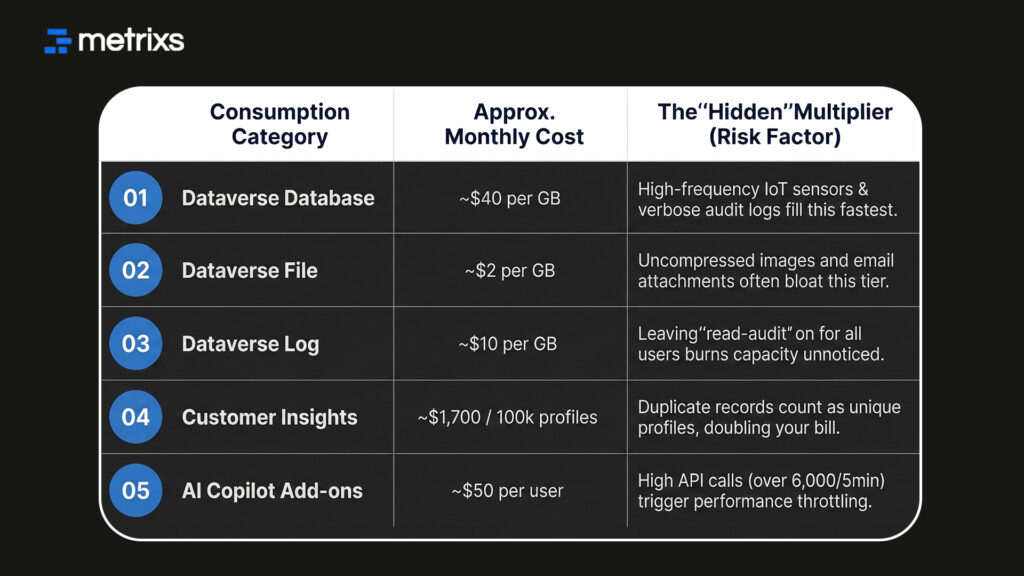
Recent updates increased default entitlements (e.g., boosting default database capacity to 30 GB for enterprise apps), but the “hidden” cost lies in overages. If you turn on high-frequency IoT sensors or full verbose logging, you will burn through this buffer in weeks. This triggers expensive penalty rates that inflate your dynamic pricing significantly.
Customer Insights profiles
Marketing modules work differently. Dynamics 365 Customer Insights is not priced by user but by “Unified People” (profiles).
- The Scale: Base pricing typically covers 100,000 customer insights profiles.
- If your marketing success grows your database from 100,000 to 500,000 customers, your software costs scale linearly with that growth.
- Warning: Costs calculated based on all unique profiles ingested. Poor data hygiene (duplicate records) literally doubles your cost without adding value.
You must treat storage as a manageable asset, not an infinite resource.
Managing these consumption costs is critical, but an even larger adjustment is coming for AI features.
3. The price of intelligence: AI and Copilot costs
The November price hikes serve a specific purpose. Microsoft frames this increase as a necessary step to cover embedded AI expenses. Your dynamic pricing now accounts for the massive compute power these tools require.
Microsoft Copilot cost structures generally fall into two distinct tiers:
- Standard Features: Basic capabilities often come included with your Core Dynamics 365 licensing.
- Premium Add-ons: Specialized agents like Copilot for Sales usually require a separate add-on. This adds roughly $40 to $50 per user to your dynamics pricing model.
You also face limits on AI token usage. Real-time reporting operates under strict service protection limits. If your automated agents process thousands of invoices rapidly, you hit the limit of 6,000 requests per 5 minutes.
This throttles your system performance immediately. You must then purchase additional capacity, which drives your dynamic pricing higher.
AI costs appear clearly on the invoice, but technical integration blind spots quietly inflate your total cost of ownership (TCO).
4. Total cost of ownership (TCO) blind spots
Integrations often slip past the budget review. Service accounts for logistics or e-commerce platforms do not require a standard user license, yet they heavily impact your dynamic pricing. These accounts consume from your tenant’s pooled API limit. You pay overage fees immediately if you exceed the daily cap.
Power Platform capacity creates another financial leak. Extending your ERP with Power Automate helps operations, but poor technical design drives up your dynamic pricing further.
Consider these common pitfalls that inflate the bill:
- Looping Workflows: A flow that loops unnecessarily burns through requests rapidly.
- Daily Caps: Standard licenses limit you to 40,000 requests per day.
- Overage Fees: Hitting the ceiling triggers “pay-as-you-go” charges.
Your total cost of ownership (TCO) no longer stays static. It moves up or down based on technical efficiency. These hidden costs add up, but specific optimization strategies help bring your spending back under control.
5. How Metrixs can help you optimize your spend
Metrixs delivers advanced analytics and reporting insights specifically for Microsoft Dynamics 365 Finance & Operations. As a product of Veratas, it helps enterprises consolidate data seamlessly. You transform raw ERP numbers into a unified view of dynamic pricing performance across finance, inventory, and operations.
With a comprehensive library of 1200+ metrics and 150+ pre-built reports, Metrixs enables 80% faster consumption-based analytics reporting and 99.9% data accuracy. It eliminates manual inconsistencies, ensuring your ERP works as a growth engine rather than just a data collector.
Key strengths:
- Rapid Integration: Get up and running in under six weeks with a seamless implementation that minimizes business disruption and clarifies your dynamic pricing structure.
- On-Demand Data Snapshots: Instantly capture historical trends and monitor Dataverse storage capacity usage alongside inventory flows for proactive decision-making.
- Multi-Region Flexibility: Effortlessly track multiple currencies and units of measurement to ensure consistent dynamic pricing reporting across global locations.
- Centralized Financial Oversight: Automate balance sheets and financial summaries to reduce manual work and maintain a real-time view of your total cost of ownership (TCO).
- Measurable Impact: Smart insights help reduce operational costs by 15% and optimize resource allocation within your dynamic pricing strategy.
Metrixs turn data into a competitive advantage, providing the clarity and speed businesses need. Connect with Metrixs today to audit your usage and take full control of your dynamics pricing before the next renewal.
Conclusion
Dynamic pricing has shifted from a fixed line item to a moving target. You now manage a tangled web of Dynamics 365 licensing, storage fees, and hidden API limits. Ignoring these shifts leads to financial bleeding. The companies that fail to track consumption-based analytics will face massive overages.
With the Business Central price increase 2026 arriving soon, unchecked AI token usage and poor data hygiene will wreck your IT budget. You risk paying premium rates for dynamic pricing while getting standard results.
Metrixs solve this visibility gap. We help you audit usage and refine your strategy. You gain the clarity needed to keep your dynamic pricing under control and ensure your ERP remains an asset, not a liability.
Don’t wait for the renewal invoice shock. Book a demo today for a licensing & analytics cost assessment.
FAQs
1. When does the Business Central price increase take effect?
The Business Central price increase 2026 hits on November 1. New customers pay immediately, while existing users see changes at renewal. This shift impacts your dynamic pricing strategy significantly. You need to plan now to manage this rising total cost of ownership (TCO) effectively and avoid unexpected budget shocks next year.
2. What is the difference between a base and attach license?
A Base license covers your primary app at full price. The attached license model adds a secondary app, like Supply Chain, for just ~$30. This structure optimizes Dynamics 365 licensing by saving you nearly 80%. Smart provisioning here prevents you from accidentally doubling your dynamics pricing for the same user access.
3. Do I pay extra for Dataverse storage?
Yes, exceeding your limit triggers fees. While you get default space, heavy consumption-based analytics often push you over. You must buy extra database, file, or log capacity once you hit the cap. Monitoring your Dataverse storage capacity is vital to keep your dynamics pricing and monthly invoices under strict control.
4. Is Microsoft Copilot included in my Dynamics license?
Standard Dynamics 365 licensing includes basic features. However, advanced agents create extra Microsoft Copilot costs, often requiring a $40-$50 add-on. High-value tools for sales or service demand this premium. You must budget carefully, as heavy AI token usage might require additional capacity packs to maintain your system speed and performance.
5. How can I lower my Dynamics TCO?
Start by auditing roles. Downgrade inactive users to a team member license to save money. Next, archive old records to reduce Dataverse storage capacity fees. Finally, lock in contracts before the Business Central price increase in 2026. These steps control your total cost of ownership (TCO) and optimize your dynamic pricing.
Related reading: 9 MS Dynamics ERP insights to end scattered reporting

